How do Largest Contentful Paint (LCP) and First Contentful Paint (FCP) relate? Is LCP more important than FCP? Let’s break down what these metrics actually mean and why they both matter for SEO and UX.
Painting is the last step of rendering. (Rendering is the process the browser uses to build the webpage). With painting, the browser displays the webpage element by element.
FCP measures the time it takes for the first visible element (text, image, or SVG) to appear on the page. It’s the moment when users get a visual indication that something is happening, reducing perceived load time. The first visible element should paint within 1.8 seconds.
LCP measures how long it takes for the largest visible element (usually a hero image, video, or heading) to fully load. It’s a key indicator of when the most important content is ready for users. The largest item should paint within 2.5 seconds.
These metrics both explain different aspects of painting content to a page. FCP helps you understand when painting starts, but LCP determines when users can truly engage with the page.
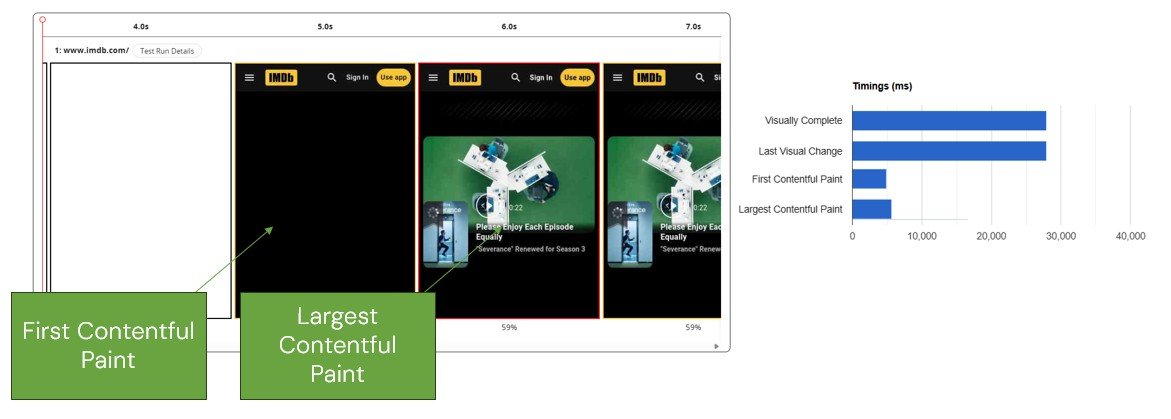
To fully understand how well your page loads, you need to measure and optimize both metrics. One of the biggest mistakes I see people make is only measuring and optimizing for LCP and ignoring FCP. This offers an incomplete view of the painting process and you’ll miss out on critical information.
Along with FCP and LCP, there are even more paint-related metrics you can use to investigate slower speeds. WebPageTest provides a great breakdown of the entire painting process, which helps you understand where specifically there are problems with painting content to your website. For example, WebPageTest’s report includes information about when the painting stopped (Last Visual Change or Visually Complete).
Bottom line: to improve your website speed, you need to measure multiple metrics. LCP is great but it isn’t enough on its own.
Want more details about all the metrics you should use to understand your website’s speed? Check out my book, Speed Metrics Guide.