How do you tell Google to noindex a PDF file? Or an image? Or a Word DOC uploaded to your server? You need the X-Robots-Tag…what is that?
The X-Robots-Tag is an HTTP Header. When a server sends back a file to a browser or robot, the server also sends HTTP Headers which contain additional information about the file requested. HTTP Headers are in a plain text field.
The X-Robots-Tag header operates like the meta robots tag, defining how links contained within the file should be crawled (follow or nofollow) and if the file should be indexed (noindex or index). Other directives can also be specified in the X-Robots tag, including whether Google is permitted to create a snippet for the file (via the nosnippet or max-snippet directives) and whether images contained in this file can be indexed (via the noimageindex directive).
As an example, let’s say you want to noindex a PDF on an Apache server. You can set an X-Robots header for that PDF in the .htaccess file. The code looks like this:
<If "%{THE_REQUEST} =~ m#my-file.pdf#">
  Header set X-Robots-Tag "noindex, nofollow"
</If>
As another example, this code in the .htaccess file would set a noindex for the file example.pdf contained in the /uploads/ directory.
<If "%{REQUEST_URI} =~ m#^/uploads/a-specific-file.pdf#">
  Header set X-Robots-Tag "noindex"
</If>
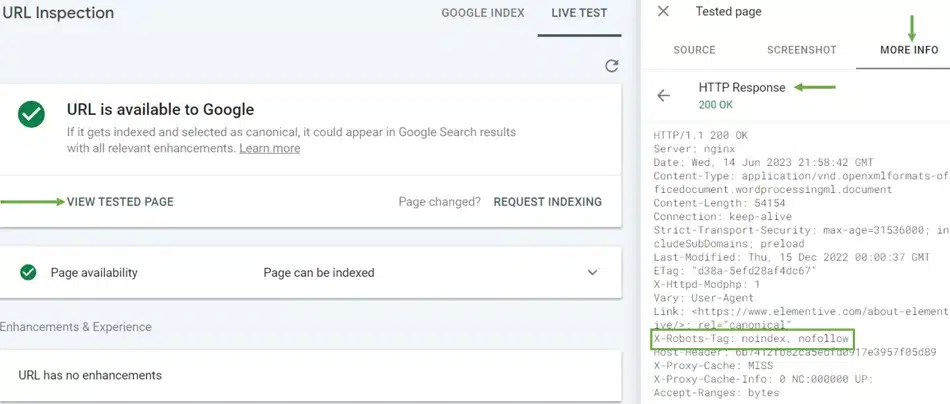
You can test to see if Google is picking this up by viewing HTTP Headers in Google Search Console using the URL Inspect feature. In your Google Search Console account, enter the URL on your website into the search field. On the inspect page, click Test Live URL to have Google fetch the PDF (or other file) after you’ve added the X-Robots-Tag.
Once the test has finished running, click “View Tested Page”. On the panel that expands, click the “More Info” tab, then click “HTTP Response”. If you have specified an X-Robots, you will see it listed here.