
Schema markup offers more than the ability to describe the entities discussed on a specific page. After you have basic schema markup code implemented, the next opportunity is to build relationships across the different entities discussed on the website.
Two Methods: Entity Map or Page Representation
There are two methods you can use when adding schema markup to your website.
The first method is a page-specific representation of entities on a given page. This is the traditional approach to schema. It is what Google’s examples show in their documentation and this is the method that most sites currently utilize.
For example, a website might have:
- The homepage contains Organization schema listing the different attributes about the company.
- Product pages contain Product schema listing information about each product.
- Blog posts contain BlogPosting schema, and possibly FAQPage schema as well.
- Author bio pages contain ProfilePage schema.
This type of implementation can be very effective and beneficial, especially for traditional search rankings. The problem, however, is that page-specific implementations are fragmented. The schema markup about a product is isolated from the schema markup about the organization. The BlogPosting schema mentions the author, but that is disconnected from the schema on the author’s page.
The other method is to implement schema as a sitewide representation of all entities across the website. This connects all the entities discussed within the website. This requires mapping how all the entities are related to each other, then reflecting that mapping within the schema markup.
A sitewide schema implementation potentially benefits AI search by making it easier for LLMs to understand how distinct pages on a website are connected to each other. For example, it more clearly establishes that the author represented in the ProfilePage on the author bio page is connected to the blog post in the BlogPosting schema on a different page.
Another benefit of a sitewide implementation is that it reduces how many times you need to repeat the same information across different schema markup. For example, information about a company will often need to be repeated in several different places. It will need to be stated on the about page, in author bios, on return policy pages, on event pages, on job posts, and more. A page-specific implementation of schema would require defining the same Organization within each page’s schema markup.
With a site-wide representation, instead of having to repeat all the information about the company, it could be defined once on the homepage in Organization schema. Then, whenever the company is mentioned in schema markup on other pages, the schema markup would reference the markup on the homepage. This also reduces the chances that some schema markup will show outdated or inconsistent information.
Sitewide and page-specific methods work alongside each other. There are some entities that will naturally connect to other entities. Other entities are only discussed on one page of a website and do not require establishing a connection. As well, some information will need to be repeated on each page regardless of the sitewide entity mapping in order to meet Google’s requirements.
Build an Entity Map
Internal Entity Mapping
Shifting to a sitewide implementation of schema starts by creating an entity map of the website. This can be a spreadsheet or diagram, or both. Here is a high-level overview of this process:
Step 1. Identify the main entities
The first step to create an entity map is identifying all the entities discussed on the website. This doesn’t have to capture every single entity. Focus on what entities are the most important given the current SEO and GEO goals, as well as the goals for the overall business.
For a website about a consulting business, the entities might include the organization, the consultants, articles, videos, and books. An ecommerce website’s entities might include products, brands, and product categories.
Step 2. Separate entities from the pages describing them
A web page is also an entity and separate from whatever entities are discussed on that page. A page about a product is an entity, as is the product discussed on that page. As another example, an author’s profile page is a web page entity, while the employee is a person entity.
One entity can appear on many pages. Your organization might be described on the homepage, identified as the publisher of articles, and listed as the provider of services. These are references to the same entity, not different entities.
Step 3. List the important information about each entity
For each entity, identify the attributes that describe and define it. An organization might have a name, website, logo, and contact information. A person might have a name, job title, and credentials. An article might have a headline and publication date.
At this stage, don’t worry about how the attributes will be captured in schema properties. Instead, focus on capturing as many attributes as possible about each entity. While doing so, you may find existing inaccuracies or inconsistencies within the website’s content. You may also find gaps in the site’s existing content. For example, maybe not all authors have links to social media profiles or maybe some products don’t have prices listed on the website. Along with reviewing what’s currently on the website, check internal databases to see what other attributes may exist that could be included in the schema and on the website.
Step 4. Connect the entities
As you review the website, keep notes on how each entity relates to other entities. It is also helpful to keep notes on how often different entities are referenced because that will help establish what relationships are the highest priority to explain within the schema markup. Pay particular attention to relationships that might not be very clear based on existing website content.
I recommend writing this out in plain language to start:
- A person founded the company.
- A person works for the company.
- A person wrote an article.
- The company published that article.
- The company provides a service.
- The company sells a product.
- The product has a brand.
- A webpage is part of the website.
Step 5. Match the connected entities to Schema.org’s vocabulary
After the entities are identified and the connections are largely mapped out, then start reviewing schema.org’s available vocabularies. Choose the schema types and properties that express it. An author would be represented by the Person type, the company could use Organization as the type (or a more specific type), and an event would use the type of Event.
Along with finding the matching schema type, also review the schema properties that are available to establish that connection. For example, a person who founded the company would be represented in the company’s Organization schema in the founder property.
Entity Map
At the end of this process, you can bring together the information about entities and how they are connected in a table. The example below includes the entity, the associated schema type, a summary of how the entities relate to each other, and the schema property used to make that connection.
| Entity | Schema type | Schema property | Connected entity |
|---|---|---|---|
| Company | Organization | founder | Person |
| Founder | Person | worksFor | Organization |
| Company | WebSite | publisher | Organization |
| Individual pages | WebPage | isPartOf | WebSite |
| Individual articles | Article | mainEntityOfPage | WebPage |
| Authors | Article | author | Person |
| Company | Article | publisher | Organization |
| Service | Service | provider | Organization |
This can also be represented visually in an entity relationship diagram (ERD). Here is an example diagram for the table above. The ERD can be created manually following the standard symbols and notations, but with a good prompt and clear guidance, AI can help turn the table and other notes into the diagram (this example was generated by Claude).
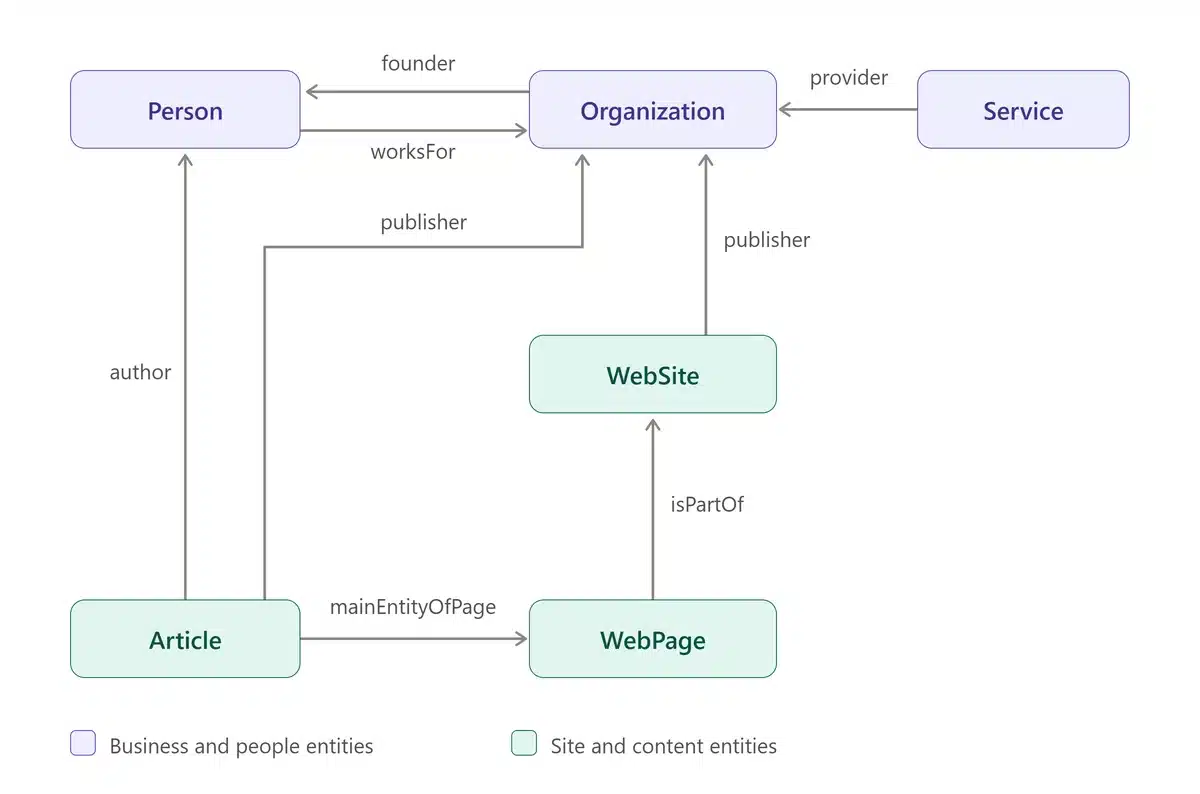
External Mapping
After mapping entities within the website, the next step is to map entities externally. This is done in schema with the sameAs property. This is used for “entity disambiguation”, or making it clear that two different webpages are about the same thing.
The sameAs property is commonly used on Organization schema to list social media profiles associated with that Organization. Without this, bots would have to guess that a social media profile represents the same company as a website. For example, here is the sameAs property from Elementive’s Organization schema that clearly states what social media profiles are connected to our company, eliminating any need for guesswork:
"sameAs": [
  "https://www.linkedin.com/company/elementive/",
  "http://twitter.com/elementivesltns",
  "http://www.slideshare.net/Elementive",
  "http://www.youtube.com/c/ElementiveMarketingSolutions"
],
This type of relationship can also be used by Google within its Knowledge Graph. Google’s Knowledge Graph is a database of entities and details about how those entities are connected. Data from this is used for different types of search features, including Knowledge Panels.
Keep in mind that Google’s Knowledge Graph is not the same thing as schema markup. Using schema markup is not guaranteed to help improve Knowledge Graph representations. However, schema is one of many factors that may help Google correctly identify entities and the way entities are connected.
Establishing Entity Relationships in Schema Code
Once the entity map is finalized, the next step is to write the schema code. This will typically require updating existing schema along with adding new schema to the website. In many respects, this is the same as any type of schema project.
However, because sitewide representations require more nuanced control over the schema markup, plugins are typically too restrictive for this type of schema markup. Instead, entity mapping schema will usually need to be added via custom programming work, either on site templates or manually on pages.
Use @id to Identify and Connect Entities
One of the most important aspects of sitewide entity representation is assigning an identifier to each entity by using the @id property. Each entity in the entity map needs to be assigned a unique @id. This allows for the schema markup about that entity to be referenced on different pages throughout the website.
Most commonly, the identifier can be the URL of the main page that discusses that entity along with a fragment (using the # symbol). The identifier is not the same as the URL, but using the URL makes it more descriptive. It can also make it easier to maintain consistent @id identifiers throughout the website. Inconsistent identifiers can break the connection between references to the same entity.
Let’s use my website as an example. My about page contains Person schema describing me, including various attributes such as my name, image, job title and more. The Person schema also assigns an identifier using the about page’s URL followed by #person:
{
  "@type": "Person",
  "@id": "https://www.matthewedgar.net/about-matthew-edgar/#person",
  "name": "Matthew Edgar",
  "url": "https://www.matthewedgar.net/about-matthew-edgar/",
  "image": "https://www.matthewedgar.net/wp-content/uploads/2024/12/matthew-headshot-1.webp",
  "jobTitle": "Technical SEO & AI Search Consultant",
  ...additional properties...
}
On an article I’ve written, I can use that same identifier within the author property:
{
  "author": {
    "@type": "Person",
    "@id": "https://www.matthewedgar.net/about-matthew-edgar/#person",
    "name": "Matthew Edgar",
    "url": "https://www.matthewedgar.net/about-matthew-edgar/"
  }
}
The matching @id explicitly identifies the article’s author as the same person described on my about page. I can reuse that identifier across all the articles I write. This way I can connect the descriptions without repeating every attribute on every article.
Decide What Information to Include on Each Page
The catch is that it isn’t clear if Google, Bing, OpenAI, Anthropic, or others will use the @id references to retrieve additional information about the stated entity.
Google does mention using @id identifiers for cross-page references within some schema guidelines. For example, when using hasMerchantReturnPolicy within Offer schema, Google says to “unambiguously reference your global return policy (located on a different page) from an Offer, using only the @id keyword.” However, this is only in reference to the site’s global return policy. Specific references like this do not imply broader support for cross-page references within schema markup.
As a result, each instance of the schema markup needs to repeat the key information about that entity. This includes repeating Google’s required properties. The schema markup cannot rely solely on the @id and trust that all search and AI bots will utilize these references.
In the schema example above, the Person schema markup on an individual article repeats my name and the URL. These are both properties Google recommends to include within Article schema. More importantly, they are also two pieces of information I want any bot reading the article’s schema markup to find directly, so it can correctly identify who wrote the article.
For each entity, decide what attributes are the most important and which attributes relate to the required or highly recommended properties. Those attributes will need to be repeated every time that entity is mentioned within schema markup across the entire website so that bots do not miss that information.
Need Help?
Do you need help mapping entities on your website and representing those entities in your website’s schema markup? If so, please contact me. At Elementive, we help companies with all aspects of technical SEO, including finding the best ways to use schema to support SEO and GEO strategies.
More Articles
Schema: Find, Fix & Prevent Problems
Find and fix common schema markup problems, from invalid code to rendering issues. Learn how to audit and test schema with crawlers and validation tools.
Read Schema: Find, Fix & Prevent Problems →Structured Data: What Is Schema?
What is schema.org? Why should you use schema on your website for SEO and AI search? What common problems happen? How do you test schema?
Read Structured Data: What Is Schema? →