
One of the biggest changes happening in search and website marketing is that website visitors are no longer just human. For years, we have optimized websites around two broad audiences: people and search engine bots. People visited the site, read the content, clicked through the navigation, filled out forms, and completed transactions. Search engine bots fetched pages, evaluated content, and decided what to include in search results.
That distinction is starting to break down. AI search fetches and summarizes pages in real time, compares information across multiple websites, and returns answers to questions without people needing to ever visit your website directly. AI agents go a step further and can complete tasks on websites for people, including things like searching for specific products, adding items to the cart, filling out forms, and more.
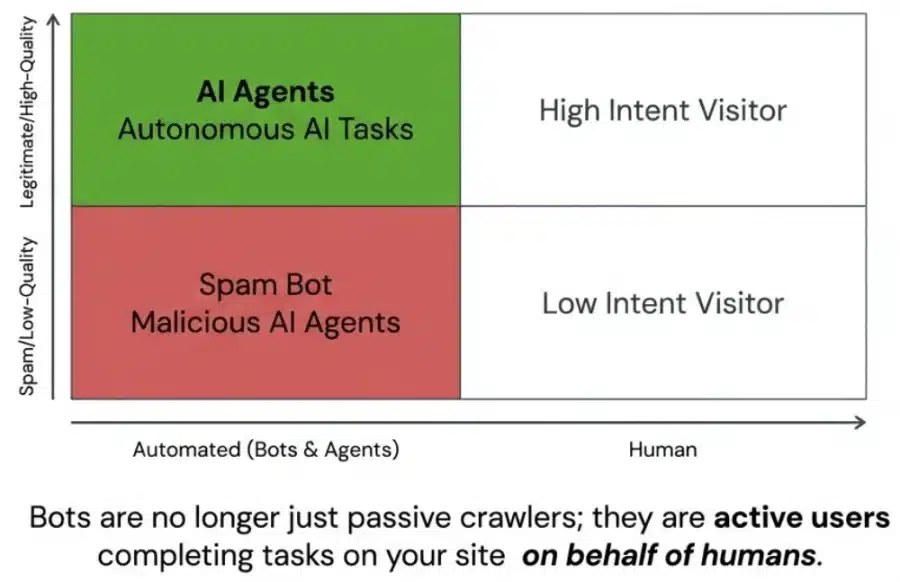
All of that means we need to think differently about who, or what, is using our websites. Broadly speaking, we have three types of high-quality visitors using our website today to consider:
- Fully human visitors, just like we’ve always optimized for. This is foundational UX, CRO, and SEO.
- Fully automated visitors, like user interaction bots summarizing our content or AI agents completing tasks without human involvement.
- Partially automated visitors, where humans use AI browsers or extensions to help them navigate our websites.
There are, of course, plenty of low-quality visitors (both automated and human as well). We need to keep those types of visitors in mind as well when building our website to make sure we have adequate safeguards in place.
In this article, I’ll discuss the different types of automated visitors and how we can track them. Let’s start by introducing key terms about the automated visitors using our websites.
Defining Automated Visitors: Bots, Agents, AI Browsers
As AI search evolves, terms like bot, agent, and user agent are often used interchangeably, but they refer to distinct behaviors. The main question to ask is: what is this system trying to do, and how is it accessing the website?
Here are the most common definitions of these terms I’ve seen across the SEO, GEO and AI communities:
Bots
Bots find your website. They follow clearly defined protocols that are task-specific and narrow in scope. Their purpose is to retrieve information from websites. A bot will crawl a website to fetch content to evaluate it for a search index (like Google’s Googlebot), gather training data for large language models (like OpenAI’s GPTBot), or answer a user’s prompt (like OpenAI’s ChatGPT-User).
Not all bots are the same. It is useful to think about the different tasks they perform and how they crawl:
- Search/indexing bots fetch new and updated content for search engines.
- Training bots gather content that may be used to train AI models.
- User interaction bots fetch a page in response to a user prompt, such as when ChatGPT-User retrieves a page to answer a question.
You may want to allow search bots and user interaction bots, but block your website’s content from being included in training data. Or, you may want to allow all types of bots to use your website. If you want to block bots, you can do so in your website’s robots.txt file with a disallow.
AI Agents
AI agents use your website. They are designed to form goals and complete complex tasks using reasoning and learning. While they still use crawling behavior to request pages and parse code, their goal isn’t simply to collect pages for an index; their goal is to help a human user accomplish something.
Learn more about AI agents and how to optimize your website for agentic visitors.
AI Browsers & Extensions
AI browsers put the AI assistant directly inside the browsing experience. The browser itself isn’t necessarily an agent, but rather the environment where the AI operates. This can assist a human visiting your website. Here’s an example of using the AI browser, Perplexity Comet.
Recap: Bots. vs. Agents vs. AI Browsers
To help clarify these distinctions, here is a breakdown of the terminology:
| Visitor Type | Main purpose | Who initiates it? | Considerations |
| Bot / crawler | Retrieve pages or files for indexation, training or simple user interaction | Search engine or AI company | Allow access and render pages to support indexation and training |
| AI agent | Complete a task | User or AI system | Ensure agents can use your site to complete tasks. |
| AI browser | Put AI assistance inside the browser | Human user | Make sure AI-assisted browsing sessions can navigate, interpret, and complete key actions |
| AI browser extension | Add AI features to an existing browser | Human user | Identify where humans need assistance and address any problems. Confirm AI extensions can correctly use your website. |
Identifying and Tracking Automated Visitors
Now that we understand who these automated visitors are, the next question is: how do we track these automated visitors?
Measuring Bots: User-Agent
We can track some automated visitors in our website’s log files or in tools like KnownAgents. In these tools, we can look for specific names of bots and agents, provided via the User-Agent string.
The User-Agent is not the bot itself. Rather, this is essentially the name of the bot. The User-Agent string is sent as part of the HTTP request headers when a bot requests a web page. For example, Google uses Googlebot as the User-Agent when crawling the web. When crawling, Google’s request will look something like this in the log file:
Mozilla/5.0 (Linux; Android 6.0.1; Nexus 5X Build/MMB29P) AppleWebKit/537.36 (KHTML, like Gecko) Chrome/W.X.Y.Z Mobile Safari/537.36 (compatible; Googlebot/2.1; +http://www.google.com/bot.html)Google declares the user agent Googlebot, Bing declares its bot as Bingbot, and so on. We can easily look at our server logs to see if Googlebot Smartphone or Bingbot crawled our site, which pages they fetched, and how often. We can also see if OpenAI, Perplexity or other AI tools fetched our content as part of building training data. Learn more about how bots like this crawl the web.
Measuring Agents: Signature-Agent
What about measuring agents on our website? Google recently introduced Google-Agent and is sending a User-Agent header for this agent. In log files, you might see something like this:
Mozilla/5.0 AppleWebKit/537.36 (KHTML, like Gecko; compatible; Google-Agent; +https://developers.google.com/crawling/docs/crawlers-fetchers/google-agent) Chrome/W.X.Y.Z Safari/537.36They are also sending a Signature-Agent for this agent. Why? The problem with User-Agent values is that they can be easily spoofed. Anybody can say they are Googlebot accessing a website, even if they aren’t Googlebot. There are ways to verify a User-Agent against an IP Address, provided the company has provided a list of valid IP ranges. Fundamentally, though, this ability to spoof the user agent is a flaw with User-Agent request headers.
HTTP Message Signatures (RFC 9421) offer a solution to this. Instead of a User-Agent that anybody can spoof, this protocol cryptographically signs an outbound request. This protocol provides a mathematical “signature” that only the real owner (like OpenAI or Google) could produce. That will make it harder to spoof AI Agents (provided companies end up using this protocol). Less spoofing hopefully means we can more easily support good agents visiting our site while eliminating malicious agents that visit.
These signatures created by the protocol are presented in the Signature-Input and Signature HTTP headers. The requestor can also include a Signature-Agent header, which can identify the tool making the request.
These are not values that can be tracked in standard log files unless your logging stack captures request headers. Cloudflare, Akamai and other CDNs are starting to offer a way to track AI agent activity. The WordPress plugin, KnownAgents, offers a way to track this as well.
Identifiers Are Optional
The big thing to note is that identifiers are optional. Many bots and agents are visiting our websites without telling us who they are. AI browser extensions simply look like normal user sessions, as do AI browsers (for example, Perplexity’s Comet uses a generic Chrome browser user agent). To track agentic activity, we have to look for indirect patterns in our analytics, such as visitors entering directly and viewing many pages rapidly within a single session.
Also, remember that automated visitors that do not identify themselves may also be malicious or spammy. If we can identify these bots, we can attempt to block them. For example, Cloudflare has a bot score that can identify visitors that are more likely to be automated and that score can be used as part of restricting the visitor.
Recap: User-Agent & Signature-Agent
| Term | Main purpose | Who initiates it? | What it may look like to the website | Considerations |
| User-Agent | Identifies the client software and environment | Browser, bot, app, tool | Value in the User-Agent header | Useful for log analysis, but easy to spoof unless IP addresses are verified |
| Signature-Agent | Helps support identification/verification in a signed-request flow | Automated client, bot, or agent using HTTP Message Signatures | Signature-Agent plus signature-related headers | More reliable, but not always captured in standard logs |
Bottom Line
Our website’s visitors are human and automated. We have to consider both when optimizing our websites. The goal is to understand which automated visitors matter to your business, allow the useful/high-quality ones, limit the harmful/low-quality ones, and make your site easier for both humans and AI systems to use.
If you want help optimizing your website for human and automated visitors, please contact me.
More Articles
Schema Entity Mapping
Learn how to build an entity map, connect entities with schema markup and @id, and decide which information to repeat across your website.
Read Schema Entity Mapping →Schema: Find, Fix & Prevent Problems
Find and fix common schema markup problems, from invalid code to rendering issues. Learn how to audit and test schema with crawlers and validation tools.
Read Schema: Find, Fix & Prevent Problems →