Can AI bots crawl your website? Last week, I found out that AI bots were unable to crawl my website. No robots.txt blocks were in place. So why was this happening? Something like this might be happening on your website as well. Here is how to tell if AI bots can crawl your website and what to do if they can’t…
First things first, you need to check if there are any blocks on the website’s robots.txt file. If so, most AI bots will respect those blocks and not crawl your website. There are free robots.txt testers online you can use to test this if you are not sure how your robots.txt file is configured. There are legitimate reasons to block your AI bot crawls.
Assuming you don’t have any robots.txt blocks, the next thing to check is your website’s log files. Log files record every hit to your website from every user agent. You should be able to access these via your hosting company but feel free to DM or comment if you need help tracking these down. Once you gain access, you want to search your log file for the AI bot user agent names (GPTBot, PerplexityBot, ClaudeBot, etc.). If you see AI bots listed, check what pages they are crawling to make sure they are crawling every part of your website you want them to crawl.
In my case, I didn’t see any AI bots listed in my website’s log file. That seemed odd. My blog gets enough traffic that I certainly would expect some amount of activity from AI bots. There can be some limitations with log files, such as hosting companies only providing a few days worth of data. If bots don’t crawl often, you may not see AI bots listed unless you check the log files regularly.
The next thing you can try is chatting with the generative AI systems directly. Ask ChatGPT what it knows about your website. Ask it to fetch content from a specific URL on your website. Ask it to summarize content from your latest blog post’s URL. You may start to see older content surface. In other cases, you’ll get a response similar to what I got in the attached screenshot: “I wasn’t able to access the page.” Those types of responses indicate AI bots are not able to crawl your website.
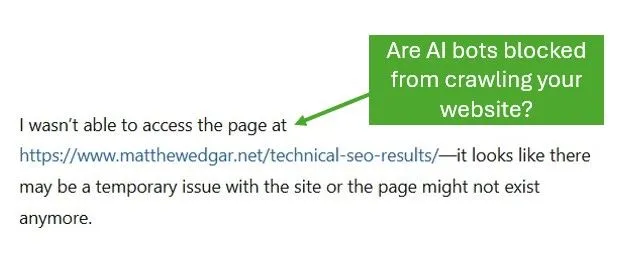
At this point, you will need to check the server configuration. Typically, that means reaching out to the hosting company to check is there are other types of blocks. In the case of my website, I found out the hosting company was “helpfully” blocking these AI bots for me in the host’s firewall settings. This was part of their anti-spam efforts. With a bit of polite pleading, I was able to get the hosting company to lift those blocks for my website.
If there are no issues with the server configuration, there could also be issues with the website itself. I’ve run into this on a few client websites where rendering issues or slower speeds prevent the AI bots from successfully crawling the website. The bots are trying to crawl but can’t. This requires working with your developers to change how the website is loaded or improve speed.