
Interaction refers to how AI bots (like agents or assistants) query your content, follow links, trigger scripts, or simulate actions to complete tasks on behalf of users.
SEO is no longer just for Googlebot. This post is part of a series on adapting technical SEO for AI bots and new search behaviors. Explore the full series.
Expanding SEO: Task-Based Searching
AI bots and agents are now capable of performing actions on behalf of people. Instead of people visiting your website, they can have an AI agent visit your website. Instead of people reading your article, they can have an AI bot read and summarize the article for them.
This changes the focus for marketers and SEOs. We now have to consider task-based searching. Instead of SEO only including searching for information on Google or conversing with ChatGPT to get an answer, we now have to consider that people will ask an AI agent to complete tasks for them.
AI agents may complete conversions on behalf of users or may assist visitors in completing a conversion on your website. We need to make sure the AI agent knows about our website, knows what tasks can be completed on our website and can successfully complete those tasks on our website. If an agent cannot understand your pricing page, compare your products, submit your form, or confirm that a booking request went through, that presents a conversion problem.
What Are AI Agents?
At its most basic level, an AI agent is a program that can autonomously perform specific tasks on a user’s behalf. For example, a user can ask the AI agent to research products or fill out forms.
Keep in mind that not every AI bot is an agent. Some bots fetch content. Some summarize pages. Some crawl for training or to build a search index. Some AI browsers can interact with pages on behalf of users. AI agents go further by planning, acting, observing the result, and continuing until a task is complete.
As a business, the opportunity is to get AI agents using your website instead of using your competitor’s website. At Elementive, we’ve been working with clients over the last year to help them understand how agents are using their websites and what kinds of things they need to do to improve how they show up for AI agents.
Before diving into the things you need to know when optimizing your website for AI agents, I’ll briefly say that while AI agents are new and there are definitely new things to think about, a lot of this comes down to web fundamentals that we’ve always had to think about. So while this is a lot, don’t let it be intimidating.
How AI Agents Work
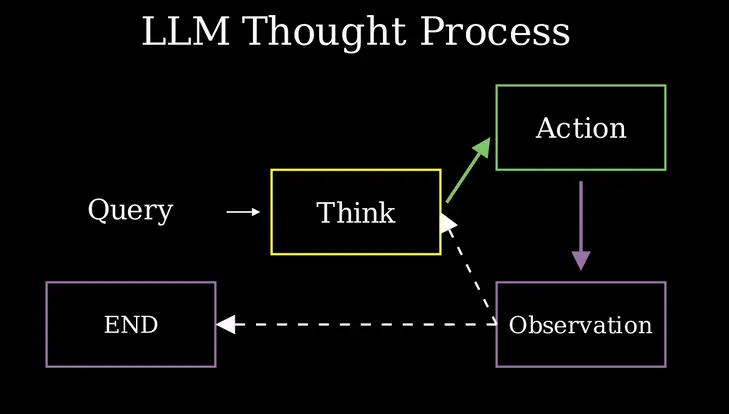
There are a few different frameworks people have used to describe how AI agents work. IBM refers to this as ReAct, standing for reasoning and acting. However, Hugging Face describes the most helpful version of this I’ve seen: Thought-Action-Observation, also known as Think-Act-Observe or TAO. As a brief summary:
- Think: Sometimes this is also called reasoning or planning. The point of this step is to have the agent figure out how it will actually complete the given task. The agent has to take in data, assess what tools are available, analyze screenshots, read code, and more.
- Act: The agent tries to perform a step needed to complete the broader task. That might involve clicking a button, filling out a form field, scrolling through the page, expanding an accordion, or some other action needed to utilize a tool.
- Observe: This can also be called reflection or evaluation. The idea here is that the agent watches for some sort of response to the given action. If it was trying to click a link, did the link do something? If the agent was trying to fill out a form field, does the form field now have a value in it? If the agent submitted a form, is a confirmation message or thank you page shown? If the action isn’t complete, the agent returns to the thinking or action stages to try again. If this step of the process is complete, then the agent moves on to the next step.
We need to optimize for each step of this loop. When an agent is trying to think about our website, what can we do to make it easier for them to assess and understand how to use the website? When an agent is trying to act on our website, do we make it easy to complete the various steps involved in a task? When an agent finishes an action, does our website make it easy to tell that the action was completed? All of these questions fall under the practice I’ve started referring to as Agent Usability.
Optimize AI Agent Usability
There are three aspects of our website we need to optimize to support agents. These are summarized in a Web.dev article about the different ways agents can view a website:
- Screenshot
- HTML/DOM
- Accessibility tree
The agent does not use these methods independently. The agent will review a screenshot of the website alongside reviewing the HTML while also considering the accessibility tree. Optimizing for AI agent visitors requires carefully considering how an agent would use all three to think, act and observe your website. Let’s talk about each in more detail.
Optimizing Visual Factors
If an agent looks at a picture of your website, can they find the text, the images, the forms, the links, the buttons, or whatever else it is they need to find? What about the visual would make it confusing or unclear where to perform a given action?
Part of the answer is good design work. Your website should have a layout that makes it obvious how to use it. That requires a clear hierarchy, appropriate use of headers, clear labels on forms, and so on. It is also important to maintain an uncluttered design that doesn’t obscure important elements. I’ve seen agents get confused by modals that they can’t figure out how to close.
Along with good usability and design work, your website should also avoid cumulative layout shift (CLS). There is a delay between when the agent thinks about what to do on the website and when they actually perform the action. If an element shifts between the thinking and acting stages, the agent will not be able to perform the action properly. I’ve seen this happen in testing out agents on websites and it can cause a great deal of confusion for the agent leading them to try completing the task multiple times. Google also discusses CLS in their guidelines.
Finally, the website’s HTML needs to align with the visual appearance of the website. Because the agent is going to use the screenshot along with the HTML, any discrepancies between the two could make it harder for the agent to understand how to perform actions on this website. For example, let’s say there’s something that looks like a button on the visual screenshot of the website but the HTML for that thing that looks like a button is actually a <div> instead of a <button> element. That contradiction could break the agent’s logic chain, preventing it from completing an action.
Optimizing HTML: Document Object Model
Clean HTML is generally considered the best practice for all aspects of website development. This is even more critical for AI agents. The more complex the HTML, the harder it will be for AI agents to understand and navigate your website. A big part of making your HTML simpler is using semantic HTML. You can learn more about semantic HTML, but the main idea is that semantic HTML uses tags that convey deeper meaning about what content the tag contains.
When using a website, an AI agent isn’t looking at the HTML directly. Instead, they are looking at the DOM, or Document Object Model. The DOM is a hierarchical representation of the website’s structure. This is visualized as a tree and each HTML element is considered a node within the tree (technically, there are different types of nodes and HTML tags are considered element nodes). The DOM tree shows how the different nodes are related to each other. Some nodes contain others, making them either parent or child nodes.
View Website DOM
You can see your DOM tree by copying and pasting your website’s HTML into a DOM visualizer. I’d suggest comparing your website’s DOM to your competitor’s. Which DOM is simpler? Which DOM uses a clearer set of tags?
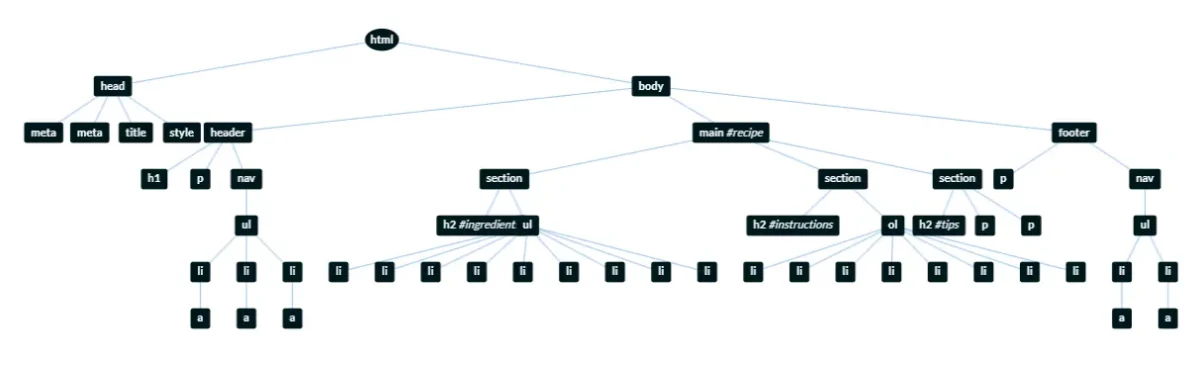
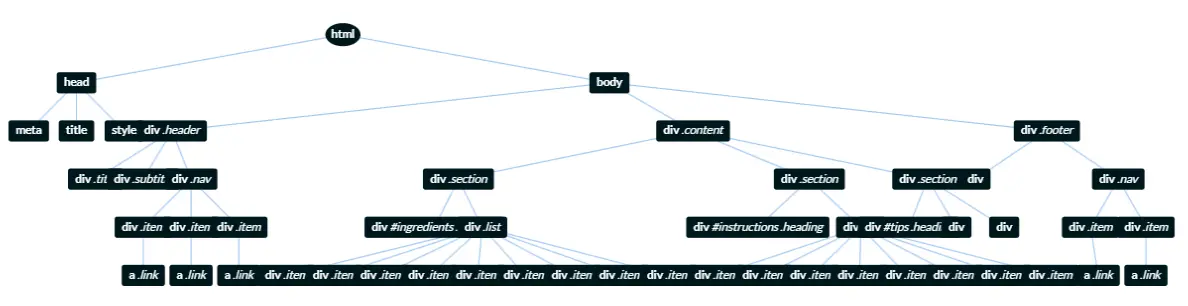
Cleaner HTML structures, using semantic HTML tags, create a cleaner DOM. As you can see in the DOM tree examples, the one site’s DOM explicitly explains the website’s layout. Even if you don’t understand HTML, you can probably make some sense of it more easily than the other example. As a result, cleaner HTML and therefore a cleaner DOM makes it much easier for agents to successfully complete tasks.
It also communicates how to interact with the page. As an example, if you create an accordion using a generic tag like a <div>, the HTML DOM does not automatically communicate its function to the agent. If you use the <details> and<summary> tags to create the accordion instead, the AI agent will have a better idea what to do with it.
The bottom line is that when websites lack clean HTML and do not use semantic tags, agents have to infer more meaning from the visual layout and agents rely on trial-and-error. All of that is computationally expensive. AI agents may fail to interact with your website, and if they do, you are going to lose potential customers.
Note: This also relates to rendering. In order to understand, process and interact with the full HTML, agents must be able to properly render your website.
Optimize Accessibility Tree
The accessibility tree is similar to the DOM in that it provides a representation of the website. However, the accessibility tree is simpler. The DOM contains every element needed to render a webpage. That includes all of the structural and visual elements such as divs, spans, paragraph tags, lists and more. The accessibility tree only shows the elements on the page that are meaningful for navigation or interaction. That includes showing specific tags along with their roles, names, and states.
Traditionally, the accessibility tree has been used by assistive technologies to help people with different abilities navigate and interact with websites. However, it is also increasingly important for AI agents. Rather than trying to interpret every detail of the DOM, AI agents can use the accessibility tree to understand what actions are available on a page and how users are expected to interact with those elements.
The accessibility tree also includes information provided through ARIA attributes. ARIA attributes help define page structure, element purpose, and interaction patterns. ChatGPT has confirmed that it uses ARIA information to better understand page structure and interactive elements. I’ve also seen ARIA used within AI reasoning chains. ARIA is one part of improving your website’s accessibility tree for both human and AI agent usability. However, remember that while ARIA helps, it should not be used as a replacement for clean, semantic HTML.
View Accessibility Tree
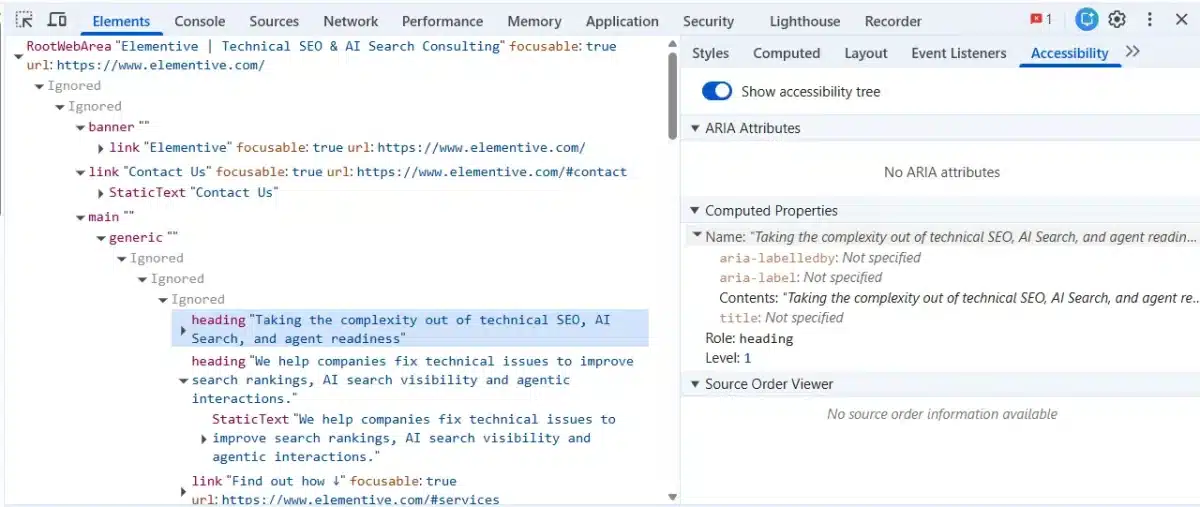
You can view your website’s accessibility tree in Chrome DevTools.
- After opening up a webpage, right-click and select “Inspect” or press F12.
- In DevTools, look for the panel that says “Styles”, “Computed”, etc. This area includes a section called “Accessibility” (you may need to click the “>>” to see this).
- After opening up the “Accessibility” section, toggle “Show accessibility tree” on.
- Once that is enabled, the HTML code presented in “Elements” will change to show the accessibility tree.
You can see an example of the accessibility tree in the screenshot below. It more clearly shows headings, links, text areas, and more than the HTML code for a given page. The side panel will also show ARIA attributes that are added for a selected element.
Other AI Agent Optimization Considerations
Allow Access
At the most basic level, AI agents must be able to access your website. In your website’s server configuration, you want to make sure that you have not blocked specific types of visitors that relate to known AI agents.
Blocks can happen with a direct block of an agent’s user agent or signature agent. Alternatively, the server can be configured to block traffic that looks automated. With Cloudflare bot scoring, you are able to block any visitors that appear to be more automated visitors. While sometimes that can be useful to block malicious traffic, it can also result in blocking valid visits from AI agents or bots.
You can monitor whether or not known AI agents and user interaction bots are accessing your website in your website’s log files, or in tools like Known Agents. You can also detect if there are issues with your website by testing this directly.
Reduce Token Cost
AI agents are complex tools and their cost is measured in tokens. The more complex your website, the more tokens it will cost a user to send an agent to your website. It isn’t clear exactly how many tokens are required to use an average website and there is currently no way to gather this data for real users.
To get some idea of token usage, a recent study looked at how many tokens are required for different types of coding tasks. In that study, they found that code reasoning tasks used 1.19k tokens. While not the same as having an AI agent visit and use a website, a code reasoning task would require a similar level of effort. That could be a lot to ask a user to spend to have an agent use your website.
However, there’s a lot of variability in token usage. The study found quite a bit of range within token usage for different task types. The study also found that human-rated evaluations of difficulty did not correlate with what was actually difficult for the agent (agents weren’t able to estimate token use correctly either).
My recommendation is that part of testing your website for agentic AI readiness should include measuring approximately how many tokens are used to complete tasks on your website. The token count will vary between different models, the different types of tasks and the different ways people write their prompts. So, this isn’t about measuring specific token usage, but getting a range of which tasks on your website use more tokens.
Once you have a general sense of how many tokens are required to use your website, you can find ways to optimize your website to reduce token usage. Many of the methods discussed above will help you reduce token cost, including optimizing HTML, using protocols, and optimizing website accessibility.
Test AI agent Protocols
There are several agentic AI protocols that have been proposed and have some limited support. These are not required and may not be appropriate for all websites. The first step is making sure your existing website is accessible and usable, using proper HTML code and clear visual structures.
However, if agents are struggling to interact with certain parts of your website, or if there are critical areas of your website where you want to streamline agentic interaction, protocols can be a beneficial resource to help optimize your website.
One of the more popular protocols gaining focus right now is WebMCP and Google is beginning to support WebMCP in Chrome. While this is only an early preview for right now, it would make sense to start using WebMCP on your website’s forms to see if that will help AI agents more successfully submit forms on behalf of users. Protocols like this may become more important over time, especially for forms, ecommerce sites, and other specific types of structured tasks.
User Interaction Bots
Another type of automated visitor interacting with our website are user interaction bots. These bots perform user actions in response to a user’s prompt. For example, I might ask ChatGPT to summarize information across three different articles I give it to read. In response to that prompt, ChatGPT sends out its bot, ChatGPT-User, to fetch content from each article. Once fetched, the content is passed to ChatGPT’s LLM, which uses the returned information to respond to my prompt. In this example, ChatGPT visited the three websites on my behalf, but I did not visit any of those websites.
User interaction bots are simpler than AI agents. They do not perform complex tasks or act autonomously. Still, they have become an important part of website traffic. On many websites I monitor, ChatGPT-User hits the website more frequently than Googlebot. Each of these hits is in response to a real user’s prompt and the hit from this user may be included in the prompt response.
You do need to keep these types of bots in mind when building your website. One of the biggest considerations is that user interaction bots, like OpenAI’s ChatGPT-User and Perplexity’s Perplexity-User, do not currently execute JavaScript when visiting a website. From our experimentation at Elementive, ChatGPT-User also appears to struggle with more complicated HTML. User interaction bots may also benefit from semantic HTML similar to agents.
Should You Block ChatGPT-User?
Should you let user interaction bots interact with your website? More than likely, some of your potential customers are asking ChatGPT-User questions related to the content contained on your website. Some potential customers might even be asking ChatGPT-User to access or summarize information on your website. As a result, allowing interaction can be a new way to reach customers.
However, 15.5% of the Top 1,000 websites block ChatGPT-User as of May 2026, according to data from Originality.ai. We have some clients who have considered blocking or are currently blocking ChatGPT-User. Many of these companies do not want their content to be used by AI tools due to concerns over proprietary information or protecting copyrights. News sites, publishers, and content creators worry (legitimately) that AI bots summarizing their content could reduce direct traffic to their websites, potentially hurting ad revenue or subscription models.
You can try to block these bots via a disallow on the robots.txt file. However, OpenAI’s documentation says that “because these actions are initiated by a user, robots.txt rules may not apply”. In my experience, robots.txt rules are inconsistent for user interaction bots. Given that, to block ChatGPT-User, or other user interaction bots, you need to block via Cloudflare (or other CDNs).
That said, I don’t typically recommend blocking user interaction bots. There is value in letting AI systems summarize data from your website, and it may help improve citations and mentions in responses. Even if you do not get traffic directly from this, it can help build brand exposure.
Remember that blocks can happen unintentionally. You can only find this out through testing. I tested out if ChatGPT was able to use my website and through a variety of prompts, I realized my hosting company was blocking ChatGPT-User from accessing my website. You can see the response I got in the attached screenshot: “I wasn’t able to access the page.” This type of response indicates that this bot is not able to use the website. I reached out to support to ask about this. They helpfully and quickly lifted a block in the firewall settings that was preventing access.

Key Takeaways: Interaction
- AI agents are a new kind of website visitor and offer a new way to use the web. Agents are not just crawling pages or collecting information. Instead, they are trying to complete tasks on behalf of users. That might mean researching products, comparing services, filling out forms, and more. For SEOs and marketers, this means website usability now needs to account for both humans and AI agents.
- Agent usability depends on how clearly your website communicates what actions are available. AI agents may use screenshots, the HTML/DOM, and the accessibility tree together to understand how a page works. If the visual design says one thing, the HTML says something else, or the accessibility tree does not clearly describe the available actions, agents may get confused or fail to complete the task.
- Many of the most important optimizations are still web fundamentals. Clear layouts, semantic HTML, accessible form labels, stable page layouts, crawlable content, and useful success or error messages all make it easier for agents to think, act, and observe what happened. These improvements help AI agents, but they also improve the website experience for people.
- AI agents have to access your website. If AI agents or user interaction bots are blocked by your server, CDN, firewall, or bot protection settings, they may not be able to use your website at all. Some companies may intentionally block certain AI bots or agents, especially when there are concerns about proprietary content or monetized information. However, many companies will benefit from allowing AI agent interactions because those interactions may influence how the conversion process.
- The best next step is testing. Choose a few important tasks on your website and see whether an AI agent can complete them. Watch where the agent gets stuck, what it misunderstands, whether it can access the page, whether it can identify the right action, and whether it can tell when the task is complete. Those failures can reveal practical opportunities.
How To Start Optimizing for AI Agents
- Conduct Agent Testing: Manually test key conversion paths using AI agents to identify where they struggle to observe successful task completion.
- Audit Technical Access: Review server logs and firewall settings to ensure AI agents and user interaction bots aren’t being inadvertently blocked.
- Stabilize Page Layouts: Minimize Cumulative Layout Shift (CLS) so elements remain in fixed positions while an agent processes a task.
- Provide Feedback for Task Completion: Review the visual output after completing tasks on the website to ensure success or failure messages are obviously presented.
- Simplify the DOM: Reduce unnecessary code complexity to lower the token cost required for agents to parse and interact with your pages.
- Implement Semantic HTML: Replace generic div-based layouts with semantic tags like <button>, <details>, and <summary> to provide clearer functional cues.
- Enhance the Accessibility Tree: Use semantic HTML tags and ARIA attributes to clearly define the roles and states of interactive elements, as these are primary navigation tools for agents.
More on Modern Bot Behavior
This article is part of my series on how AI search is changing technical SEO and breaks down how we optimize for the six modern bot behaviors.
Return to the start: Discovery: How bots find your website’s content
Need help understanding how AI agents and bots are using your website? Contact me and let’s talk.
More Articles
Schema Entity Mapping
Learn how to build an entity map, connect entities with schema markup and @id, and decide which information to repeat across your website.
Read Schema Entity Mapping →Schema: Find, Fix & Prevent Problems
Find and fix common schema markup problems, from invalid code to rendering issues. Learn how to audit and test schema with crawlers and validation tools.
Read Schema: Find, Fix & Prevent Problems →