
Rendering is the process of executing code (especially JavaScript) to fully load a page so bots can find and extract all of the page’s content.
SEO is no longer just for Googlebot. This post is part of a series on adapting technical SEO for AI bots and new search behaviors. Explore the full series.
What is rendering?
After Google’s bots crawl and fetch the page’s content, the bots need to process the retrieved code. This process is called rendering. It is necessary because the crawl only fetches the initial HTML from the website’s server. That initial HTML may not contain all of the page’s content. Some of the content may be loaded later by JavaScript.
During rendering, Google’s bots load the initial HTML and any additional files referenced in that HTML code, including CSS and JavaScript files. To do this, Google crawls using a headless browser. A headless browser does not have a visible window but otherwise operates like a normal browser, allowing bots to load and experience a webpage the same as a human visitor. There are several steps involved in the process of loading a page. A high-level summary is below. For more, I discussed these steps in detail in my book, Speed Metrics Guide.
- Parse: The bot needs to process the initial HTML is received from the web server in order to understand how the page is displayed. The bot uses the headless browser to execute JavaScript and handle any adjustments JavaScript makes to the page’s HTML, such as loading in additional text or images. The final output of the HTML processing is the Document Object Model (DOM).
- Style: Along with HTML, the bot also uses a headless browser to receive and process CSS code. The CSS code contains instructions for styling different elements on the page, such as an element’s font size or color. The output of the processing is the CSS Object Model (CSSOM)
- Layout: The headless browser brings the DOM (with the information about the HTML) and the CSSOM (with information about the styles) together in a render tree. The render tree contains information about all visible elements on the page. The browser uses the render tree to calculate the position and size of each element on the page.
- Paint: The browser finishes loading fonts and image files, then paints, or displays, all visual elements on the webpage. When the browser starts painting elements, bots finally begin to see something on the website and are no longer looking at a blank screen. At this point, bots can extract the page’s final content output.

Why do bots sometimes skip rendering?
One common reason for skipped rendering is blocked JavaScript or CSS files. This can happen if these resources are disallowed in the robots.txt file or if firewall settings prevent bots from accessing them. Regardless of the cause, it’s important to remove these blocks so bots can fully load and process all JavaScript and CSS files.
Another frequent issue is slow page load times. If a page takes too long to render, Google’s bots may time out before loading all its content. In these cases, optimizing paint-related speed metrics, like First Contentful Paint (FCP) and Largest Contentful Paint (LCP), can make a difference. These paint-related metrics measure the later stages of the rendering process, so improving them can help speed up rendering overall.
Remember, though, that rendering is an additional step beyond crawling the page that bots may not take. There is no guarantee the page will be rendered. This is why it is important to have critical page content in the initial HTML so that if the page is not rendered, at least bots will still see the critical page content.
Google has worked extensively over the years to improve its rendering process. Most pages now will be rendered by Googlebot, provided major problems are avoided and no blocks are in place. Bing does execute JavaScript as well, though their rendering engines are not always as sophisticated or robust as Google’s rendering engine.
Newer AI bots, though, do not currently execute any JavaScript (several studies have found that AI bots do not currently execute JavaScript, an additional study found the same, and other studies have as well). These bots will only load the page’s initial HTML. While this will likely change in the future as the AI bots are improved, for now at least, AI bots will not be able to retrieve any content on your website that is only loaded via JavaScript.
What are common rendering problems? How can these problems be avoided?
Even at its most sophisticated, Google’s bots are unable to execute all types of JavaScript. Search bots crawl in a stateless manner, meaning those bots do not interact beyond loading the page. At best, then, these bots will see any content added to the initial HTML by JavaScript immediately after the page loads.
However, these bots will not scroll, click, hover, or interact in any other way with elements. Sometimes content is added to the page in response to these types of actions. Because they do not scroll or click, search bots will not see this content.
One common example is infinite scroll. As you scroll down a long list of items, more items are added. E-commerce sites might use this on category pages listing products, or a directory might use this on its listing pages. Because bots do not scroll, they will only see the first list of items and will miss additional sets of items. Google’s recommended solution for infinite scroll is to build a non-JavaScript pagination in the background.
This can also happen with accordions, where content is only loaded after clicking to expand the accordion. Another common place I have seen rendering problems is with the main site navigation, where links are only loaded after hovering over a dropdown or after clicking the hamburger icon. For accordions, dropdown menus and other similar cases of showing/hiding content, the solution is to have the content in the initial HTML but hidden with “display:none;” in the CSS. Then, when a visitor interacts, change the display of the element instead of loading the content.
Side note: Hiding content that can be exposed by visitors via a hover or click event will not violate Google’s spam policies. These policies target content that cannot be “easily view[ed] by human visitors.” An accordion or navigation with a show/hide effect can be easily viewed by human visitors and would not be considered spam.
Note that some types of bots, like AI agents, may be able to interact with the page. These bots are still experimental, so it is not yet clear how effectively they will interact with the page. So, even for these bots, it still makes sense to simplify rendering by avoiding the need to interact with the page.
What tools test and debug rendering issues?
There are a handful of tools you can use to test how your website is rendered. There are two Chrome extensions I highly recommend for testing how JavaScript is used to load your website content. These extensions let you see the website with and without JavaScript to understand what content is included in the initial HTML and what content is found only after the page is rendered.
- Toggle JavaScript. This extension provides a quick test. After installing, you’ll have a simple on/off switch for JavaScript. Load your website, toggle off JavaScript, the page will refresh and then you can see what content is missing. Check if any content or page features are missing. If nothing is missing, then no further testing is needed. If some content (or a lot of content) is missing, that indicates there is content bots will not be able to crawl. (Side note: be sure to toggle JavaScript back on after testing!)
- View Rendered Source. This extension is helpful for a deeper dive. After loading your website, click this extension and it will open a report showing the Raw code (loaded from the server), the Rendered code (the code after JavaScript has executed and loaded content) and the Difference between the two. The following screenshot is an example report highlighting the differences between Raw and Rendered code. You can step through the highlighted differences and clearly see what content is loaded via JavaScript. As you do, you need to decide how important it is that bots crawl that content. If the content is important for bots to learn about your company, then it would be helpful to change how this content is loaded so that it loads from the server (and is present in the Raw code).
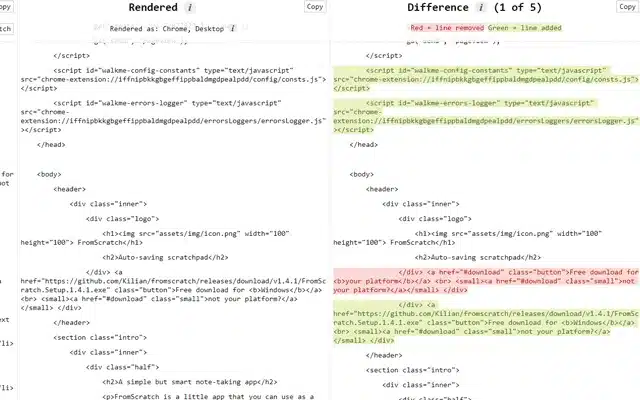
There are also ways of testing rendering in Chrome DevTools. For example, you can evaluate network requests to see what JavaScript files are used to construct the page. DevTools also lets you block specific scripts to understand their impact on rendering.
The most helpful tools, though, are Google Search Console’s URL Inspection tool and a similar tool provided by Bing Webmaster Tools. These tools will simulate a crawl by Google or Bing, returning the HTML that these bots are able to load on the page.
I walked through all of these methods, showing how to test rendering, in the following video:
Key Takeaways: Rendering
- Keep important content in the website’s initial HTML code returned from the server (the server-side code). Do not rely on JavaScript to load important content.
- If JavaScript needs to be used to load content, make sure bots can load all JavaScript files. Do not block JavaScript files in the robots.txt file or limit access in firewall settings.
- Do not load important content behind click, hover, or scroll events. If content is loaded via these methods, find alternative ways of loading the content for bots.
- Test if important content (text and images) on each page is rendered. From this testing, you should have a clear understanding of what content is in the initial HTML, which content is loaded by JavaScript immediately after load, and what content, if any, is loaded by page interactions (like clicks or scrolls).
More on Modern Bot Behavior
This article is part of my series on how AI search is changing technical SEO and breaks down how we optimize for the six modern bot behaviors.
Read the next part: Indexing: How bots store and retrieve content for search and AI responses
Need help understanding how AI bots are using your website or want to optimize for AI search? Contact me and let’s talk.
More Articles
Schema Entity Mapping
Learn how to build an entity map, connect entities with schema markup and @id, and decide which information to repeat across your website.
Read Schema Entity Mapping →Schema: Find, Fix & Prevent Problems
Find and fix common schema markup problems, from invalid code to rendering issues. Learn how to audit and test schema with crawlers and validation tools.
Read Schema: Find, Fix & Prevent Problems →