
Log file analysis helps you understand how AI and search bots use your website. By reviewing log files, we can determine if bots are finding and fetching every page on the website. This is the most fundamental aspect of search and AI performance. If bots struggle to crawl a page on the website, that page may not rank highly in search results or earn citations/mentions in AI responses.
The information in the log file can help you answer several key questions to better understand how search engine and AI bots use your website. This includes:
- Can bots from Google, Bing, OpenAI, and other platforms successfully crawl your website?
- How often does each bot crawl the website? Are the crawl patterns consistent or variable?
- Are bots finding the key pages on the website or are they crawling unimportant sections of the website?
- How often do bots recrawl old pages?
- Can bots crawl resource files, like CSS or JavaScript files?
- How often do bots encounter errors during a crawl, including 404s and server errors?
- Do bots respect instructions on the robots.txt file?
- Do bots use the website’s XML sitemap files?
- Do AI bots use the website’s llms.txt file?
Information Available in Log Data
Server logs are also called access logs because they contain a record of each file that was accessed by visitors on a website. Within each record, you can see what file was accessed, when that file was accessed, details about what bot or browser requested the file, and how people accessed that file.
Here is an example log file entry for a visit from ChatGPT-User:
12.345.67.890 www.matthewedgar.net - [21/Sep/2026:13:48:50 +0000] "GET /redirecting-urls/ HTTP/2.0" 200 18576 "-" "Mozilla/5.0 AppleWebKit/537.36 (KHTML, like Gecko); compatible; ChatGPT-User/1.0; +https://openai.com/bot"Here is another log file entry from a visitor, with a referral from https://www.google.com:
12.345.67.890 www.matthewedgar.net - [21/Sep/2026:13:42:48 +0000] "GET /generative-ai-vs-traditional-search-technical-differences/ HTTP/2.0" 200 17741 "https://www.google.com/" "Mozilla/5.0 (Macintosh; Intel Mac OS X 10_15_7) AppleWebKit/537.36 (KHTML, like Gecko) Chrome/153.0.0.0 Safari/537.36"Within the entries, we can see different information about the visits. Let’s step through each component:
- Client IP Address: This is the IP address of the visitor or bot (referred to as the client) that made the request. In both examples, I anonymized the IP address. You can use this IP address to help determine if the visit is valid.
- Requested Host: This is the target domain being accessed on the server. In the examples above, my website is being requested.
- Timestamp: This shows you the exact date of the request. It states the full date, hours, minutes and seconds (21/Sep/2026:13:48:50) with a timezone offset from UTC (+0000 would indicate no offset).
- HTTP Method: The method used by this visitor to request resources. It will often be set to GET for visits making ordinary requests for webpages.
- Requested Path: This shows you the URL path of the resource being requested. In the first example above, ChatGPT-User was making a request for the URL /redirecting-urls/.
- HTTP Protocol: The version of the HTTP protocol used for the connection. In this example, that is HTTP/2.0. HTTP/2 is the default for modern browsers and Google has indicated they support this protocol for eligible sites. Certain types of browsers and bots might still use HTTP/1.1, and some platforms might use HTTP/3.
- HTTP Status Code: The next number in the record shows the HTTP status code for this response. In these examples, that is 200, indicating that the request succeeded. This is where you can check for error status codes.
- Bytes Sent: This indicates the size of the returned response body sent to the client. This is stated in bytes. In the first example, that is 18576 bytes, or about 18.6KB. There is some variance in how this is measured and reported. However, it can be one way to check if there were any empty pages that may have been sent to bots.
- Referrer Header: In the first example, we see a “-” after the bytes. That is a placeholder for the referring page URL. ChatGPT-User, like most bots, will not send referrer header data. However, entries for human visitors will often include this to indicate the visit’s source. In the second example, you can see the referrer data, with the visit coming from Google.
- User-Agent String: Finally, we have the user-agent string. This identifies the visitor. In the first example, that string includes “ChatGPT-User/1.0”. In the second example, we can see this is a visitor using Chrome on Mac.
There are a few important things to remember when reviewing log file entries:
- The exact fields that will be included will vary. This depends on what data the requesting browser or bot sends. As well, the server or CDN can change what information is presented.
- A declared user agent does not necessarily prove the requester is legitimate. User agents can be spoofed, so that example visit from ChatGPT-User above may not have actually been from OpenAI but could have come from somebody pretending to be OpenAI. Verification requires using IP validation, reverse DNS, or other authentication methods such as HTTP Message Signatures.
- Most log files will include an IP address, which can be considered personally identifiable information (or PII) and may be subject to privacy laws. If you are unfamiliar with the laws governing how to handle IP addresses for your organization, consult with a lawyer.
As well, remember an entry in a log file only establishes that a bot requested a URL. They cannot, by themselves, prove that the search engine or AI system did anything with that URL after the request was made. The content fetched during a crawl might be used for training, might be indexed, might rank or might be cited. Log files are only one part of measuring SEO and AI search performance.
Pro Tip: Other File Types
Along with the HTML pages on the website, the log file data also records all resource files that were loaded, including JavaScript, CSS, and image files. Reviewing resource file crawls helps you establish if bots are able to successfully load these different types of resource files. On some sites, I have found that bots regularly get 404 or 5xx errors on resource files. If bots are getting errors on resource files, that means they are unable to successfully load JavaScript, CSS, or image files. In that case, they may not correctly process the HTML pages on the website.
Log files also contain bot hits for resources that help SEO and GEO performance, like the robots.txt file, XML sitemaps, or llms.txt files. It is helpful to check log file data to make sure that bots are successfully loading each of these file types. If they are not loading an XML sitemap file, that could prevent pages from being discovered or indicate other problems with your website’s performance. As well, checking crawls of these types of files is especially important if you are experimenting with the llms.txt file as part of GEO efforts.
Accessing Log Data
There are many different tools to help you parse the data contained in your website’s log files. What tool you need to use will change based on how your website is configured, where your website is hosted and what CDNs you are using. Here is a brief overview of some options available to access log data, along with other sources to access information about bot crawling activity.
Raw Access Logs
The best possible choice is accessing the raw server access logs. Here are links to support articles to access log files from a few of the more popular hosting companies:
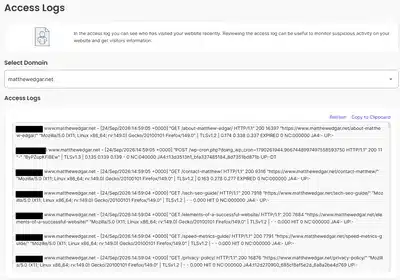
A couple of things to keep in mind when obtaining raw access logs:
- Hosting companies may include different data within their access logs. Some companies give you the actual log data, while others give you a modified version of it.
- There are usually differences in the time period available in the hosting company’s log data. In a few cases, I’ve seen only a few hours of data, though many store 24 hours of data or up to a few days. A few may store up to 30 days. The best option is to download the raw access logs on a regular basis and create an independent database of bot activity.
For other companies, search the support articles for “raw access logs” or “log analytics”. You can also ask the hosting company’s support how to obtain access log data. If your company self-hosts the website, this request may route to the IT department. Here’s an example request to make:
“Can you provide 30 to 60 days of HTTP access logs containing the request timestamp, requested URL, user agent, IP address, response status, response size, and response time?”
It may also be helpful to ask for access logs from specific user agents. See the list of key SEO/GEO user agents in my article about how bots crawl a website.
What about Shopify, Webflow, and Squarespace?
Shopify does not provide any access to log files. The native analytics are based on JavaScript, which bots execute unreliably. There is a workaround where Shopify data can be proxied through Cloudflare. Once traffic is passed through Cloudflare, you can capture real request-level logs there and use a Cloudflare Worker to intercept and log every request. Cloudflare’s Logpush documentation covers the mechanism. However, Shopify has indicated that Cloudflare proxies can interfere with store connectivity.
Webflow also does not provide access to log files. However, they have an LLM-bot insights feature that reports on activity from the major SEO and AI search bots. This requires a Team or Enterprise plan with the newest version of Enterprise Analyze. Similar to Shopify, Webflow traffic can be proxied through Cloudflare and then track bot activity in Cloudflare.
Squarespace is more limited and does not offer a way to access log data or any information about how bots crawl the website. They do have a 7-day activity log, but this does not show bot data. Squarespace can be connected to Cloudflare, though proxy settings can interfere with the connection.
Cloudflare: Bot Analytics
For websites routing traffic through Cloudflare or Akamai, both services provide reporting on bot activity. These reports aren’t the same as the raw server logs, but still provide much of the same data.
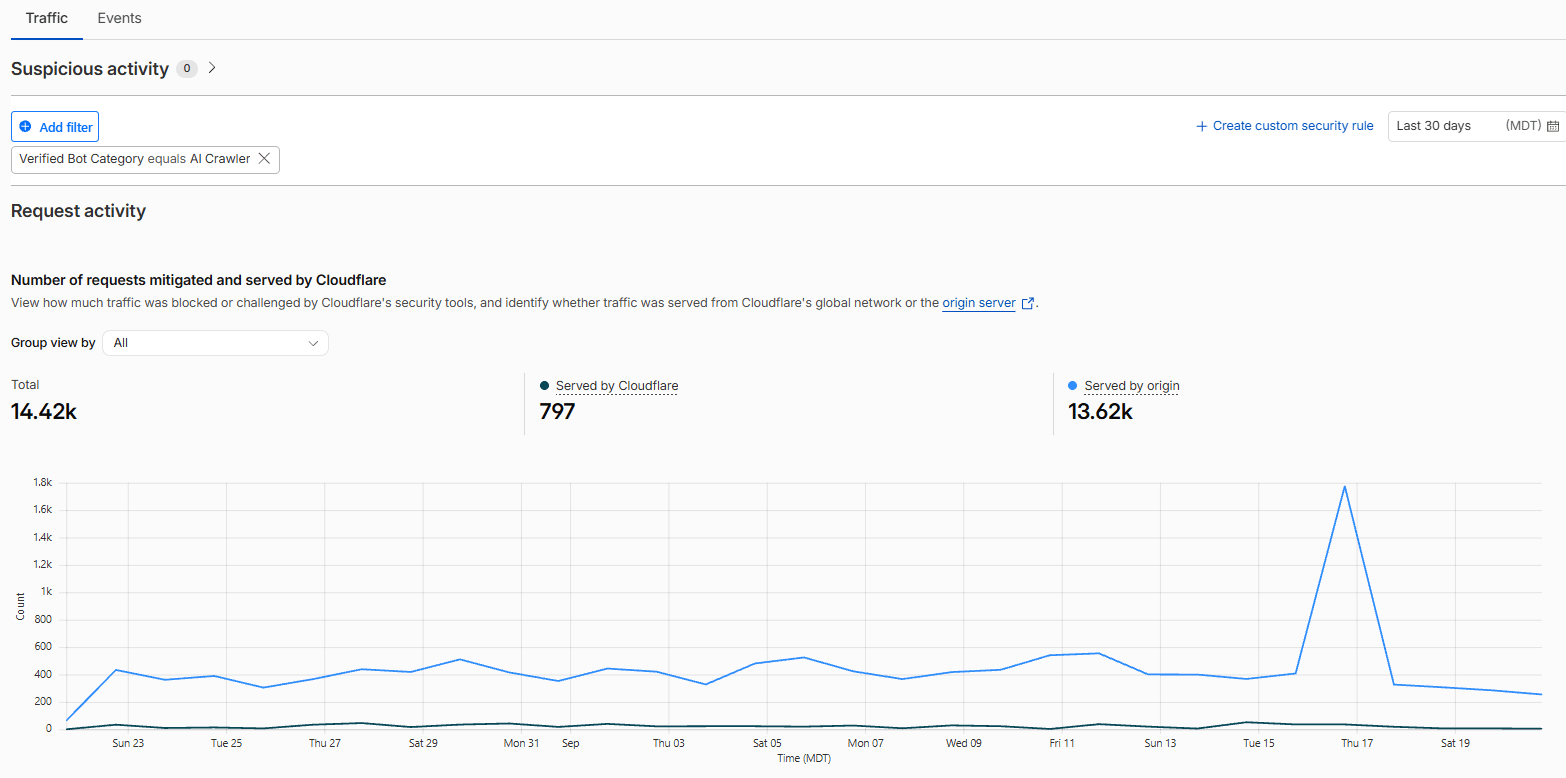
Cloudflare offers Bot Analytics. Within these reports, you can segment visit activity by different criteria, including verified bot categories. For example, this screenshot shows a segment of Cloudflare activity data for AI Crawlers over the last 30 days.
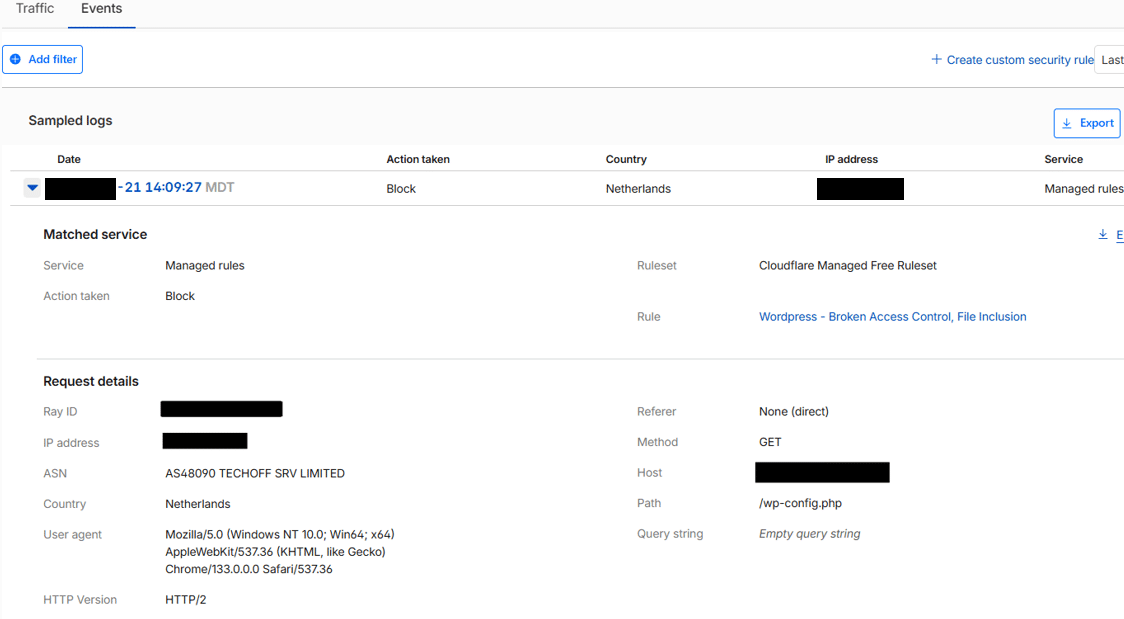
Cloudflare’s Analytics data also provides information about individual events. This is similar to reviewing individual entries in a log file. This event shows an attempt to access this website that was blocked.
Other Options: Known Agents and Google Search Console Crawl Stats
Known Agents
Known Agents is an alternative way to monitor bot activity. It also provides other information about AI search and AI visibility. While it is not a complete substitute for raw log files, I’ve found it to be a really useful tool that answers most of the same questions you can answer with log files.
Known Agents is usually easier to configure. They have a WordPress plugin. There is also a way to call their API from the website’s backend code. They have paid and free levels. The free level works really well for websites with less activity, but on the free level there is a limit to how much data is stored.
In this video, I walked through how Known Agents works and what the reports look like. (Known Agents was previously called Dark Visitors.)
Google Search Console Crawl Stats
Google Search Console’s Crawl Stats report contains information about how Google’s bots have crawled the website. They provide different ways to analyze the crawl data and also show how often Google has crawled non-HTML pages on the website. Overall, I’ve found that the data is directionally accurate when compared with raw server logs.
The drawback is that this only shows data about how Google crawls the website. It doesn’t provide information about how any other bots crawl the website. The value, then, is more limited as a way to understand broader AI bot activity. That said, Crawl Stats is still very useful in explaining how Google crawls your website. Here is a video I published recently walking through the Crawl Stats report:
Analyzing the Log File
To see how you can use log files, let’s review three of the key questions you can answer with data from log files. These example questions are not exhaustive. Logs contain a lot of information that can be segmented and analyzed in many different ways to understand different aspects of how bots are accessing your website.
Question 1: Which bots are crawling the website?
You want to start by understanding what bots are crawling your website. Begin by tallying up crawls across the different bots. There are two primary ways to think about the different types of bots crawling the website:
- Group the different bots by user-agent strings, such as Googlebot, Bingbot, Meta-ExternalAgent, and so on. See the most important user agents in my article about how bots crawl a website.
- Group the different bots by purpose, such as search indexing bots, training bots, user interaction bots, and so on. Some tools may give you categories for each bot which can help in this categorization. You can read more about the different types of bots in my article about automated website visitors.
Here is an example of what this may look like once you have the crawls summarized by user agent and bot purpose:
| Bot User Agent | Bot Type / Purpose | Total Crawls |
|---|---|---|
| ChatGPT-User | AI Assistant | 140,710 |
| Baiduspider | Search Engine Crawler | 97,301 |
| bingbot | Search Engine Crawler | 95,225 |
| Googlebot | Search Engine Crawler | 83,780 |
| meta-externalagent | AI Training | 82,051 |
| PerplexityBot | AI Search Crawler | 62,082 |
| Amazonbot | AI Training | 38,785 |
| AhrefsBot | SEO Tool | 30,961 |
| Sogou web spider | Search Engine Crawler | 24,953 |
| ClaudeBot | AI Training | 20,666 |
You can also summarize by bot purpose. How you categorize each bot may differ, but this type of summarization will help you understand what types of bots are crawling your website to identify potential problems and, more importantly, help you understand what types of bots are crawling your website.
| Bot Type / Purpose | Total Crawls |
|---|---|
| Search Engine Crawler | 335,166 |
| AI Training | 167,236 |
| AI Assistant | 147,263 |
| AI Search Crawler | 122,906 |
| SEO Tools | 99,117 |
Once you have summarized crawls by user agent and by bot purpose, check if any expected bots or categories of bots are missing from the data. When I’ve reviewed log file data for clients, I’ll sometimes find that key AI bots are missing, such as any of OpenAI’s bots or Anthropic’s. It may also be that an entire category is missing, such as AI training bots. If bots are missing entirely from the log file data, that may indicate those bots have been blocked from accessing the website. You can review the robots.txt file disallow statements as well as server rules that may prevent bots from accessing the website.
Next, review how much activity comes from unwanted bots. This may include spam bots with malicious intent, but it may also include bots from foreign companies, representing countries where you do not have customers. For example, unless your company has customers in China, you likely do not need Baiduspider crawling your website. Unwanted bots can be blocked from crawling the website.
Unwanted bots may also include bots from SEO tools. We had one client with excessive crawls from the AhrefsSiteAudit bot. This bot is used by Ahrefs to crawl and analyze a website. While Ahrefs is a valid SEO tool, this client was not using Ahrefs internally. More than likely, crawls from this bot indicated competitors were analyzing this company’s website using Ahrefs. As a result, this company made the decision to block bots from Ahrefs and other SEO tools that they were not using.
Question 2: What parts of the website does each bot crawl?
After determining which bots are crawling, you need to know what pages each bot is crawling. Pages that do not get crawled often might not rank well in search results or earn many mentions in AI responses. It is also important to make sure that training bots are only accessing pages that should be included within AI training data.
Reviewing page crawls is easier to do for groups of URLs. Segment the website’s pages by different categories, such as:
- Site section
- Page type
- Top of funnel vs. bottom of funnel
- Template
- File type
- Query-string pattern
- Indexability
- Sitemap inclusion
Along with these broad groups, you can also check crawls of key pages individually. However, watching entire sections or page types can help you more clearly observe trends.
Review how often each bot is crawling each group of URLs. Not all bots are going to crawl the website the same way. Bingbot may heavily crawl one section or page type that Googlebot ignores, and vice versa. Meanwhile, OpenAI’s training bot (GPTBot) may only crawl some sections of the website. Certain bots may overcrawl pages with query strings, while other bots ignore URLs with query strings.
Variation in how each bot crawls is normal, but if a bot isn’t crawling one group of URLs, it is important to understand why that is happening. There are a few common causes why certain bots may not be crawling parts of the website:
- Internal links: One common reason is that there are not enough internal links referencing the page. This will prevent the page from being discovered by bots. In that case, adding more internal links to the pages that aren’t getting crawled (or external links if those external links are of decent quality) will help make those pages look more important and increase the chances that those pages will be crawled.
- Authentication: There can also be restrictions on the server preventing bots from accessing part of the website. When attempting to access the page, bots may receive a 401 or 403 status code asking for credentials or forbidding access. In some cases, that is the correct behavior, like with staging environments. In other cases, this has happened accidentally, such as by restricting access to specific user agents.
- Blocks: In other cases, bots are not crawling specific pages on the website because they are blocked. This can happen with robots.txt disallow statements, or from things like WAF rules that prevent bots from reaching the website. Sometimes, these blocks are the intended behavior because specific bots should not access specific pages. For example, many websites are restricting AI training bots from accessing certain types of content. In other cases, the blocks happen accidentally or unintentionally, or in other cases because of using default server rules.
You might also find that while bots are crawling certain pages, the overall crawl volume is much lower than you would intend it to be. There can be a number of reasons bots crawl some page types at a lower level. Some of the most common reasons include:
- Rendering: A limited amount of crawls could indicate that bots are unable to render pages properly. The bot may attempt to access the page but finds the page is empty because it cannot execute JavaScript. As a result, the bot may scale back subsequent crawls of that page and others like it. Working with clients, I’ve found that fixing rendering problems can increase crawling activity simply because bots realize there is now something there to crawl (this tends to be the case with Google more than other bots).
- Errors: There may also be errors happening on pages within one section of the website. For example, when reviewing a client’s logs, we found that an entire section of the website was returning server errors to all the major bots. This wasn’t due to any blocks or WAF rules, but due to a bug in the code causing timeout errors on a specific template. Here again, when server errors are encountered, bots may scale back crawls in response to the server error.
- Speed: If a page loads slowly, bots may timeout before the page loads, preventing a successful crawl. If this happens regularly on specific pages or specific sections of the website, bots may reduce their crawls of these sections. If you see a reduced amount of crawls, review the different speed metrics for these pages. Pay close attention to Time to First Byte (TTFB) since that indicates how long it takes for a browser or bot to make a connection to the web server.
Question 3: Are important pages being crawled frequently enough?
Bots need to crawl pages frequently enough to identify any changes that have been made. How often pages get crawled will differ throughout the website, depending on the nature of the content. Google, in particular, will adapt Googlebot’s crawl strategy to its understanding of update frequency. So, the blog might be recrawled more often than the About Us page, since changes are more expected there.
If you’ve never reviewed your log files before, start by monitoring your log data through several rounds of content updates to establish a baseline for each bot that is crawling your website. I have found 90 days’ worth of data is most useful to establish baselines, though some pages that are crawled very infrequently may still be missing from a 90-day window.
For each bot and page type, measure:
- Time from publication or update to first crawl
- Days since last crawl
- Crawl frequency by page type
I’ve seen the time from publication to first crawl range from a few hours to several days depending on the size of the website and the exact nature of the changes. The crawl frequency by page type can also vary dramatically. On one site, most pages only received one crawl per month from Googlebot, but a handful of other pages received hundreds of crawls each day.
All three of these metrics will differ by bot. Google and Bing typically crawl more consistently and steadily, frequently returning to the website’s content. As a result, the days since last crawl will be shorter and the crawl frequency by page type may be higher. In contrast, AI training bots tend to not be as consistent. For example, GPTBot crawls in infrequent bursts. So, the days since last crawl will be much longer, but because of the intense bursts, the crawl frequency by page type might be much higher. Keep these differences in mind when establishing baselines about crawl frequency.
Different patterns are likely to emerge from the crawl frequency data:
- Consistent: Similar crawl volume each day or week.
- Bursty: Large numbers of requests in a short period.
- Event-driven: Activity changes after publishing, a migration, a release, or a sitemap update.
- Concentrated: Most activity occurs within one directory or page type.
- Shallow: A bot repeatedly requests a small number of prominent pages.
- Expansive: A bot begins exploring parameters, pagination, filters, or newly discovered URL patterns.
- Declining: Crawl volume or coverage decreases over time.
- Error-driven: Bots repeatedly return to broken, redirected, or unavailable URLs.
Once you have your baseline of crawl frequency, you can start to spot newly added or recently updated pages that are not getting crawled quickly enough. Bots should be crawling recently updated or added pages to find the latest information from your website within the normal baseline you’ve observed. If a page is not crawled within a normal amount of time, investigate if internal links need to be added or if other errors exist. Content updates might also not be recrawled by bots if the update was not substantial or if the last update date is not presented clearly on the page.
Similarly, check if bots are crawling older pages that have been removed from the website. This can help you understand why older pages are still in Google’s index or appearing in ChatGPT’s responses, even if they currently return a 404 not-found error. Sometimes, if an old, removed page is still ranking or being cited, that is because the bot hasn’t successfully crawled that old page and hasn’t seen that the page was removed. In other cases, the removed page is still linked to throughout the website, so the bot may assume the page is still a valid part of the website.
Log Review Frequency
Log files are an important part of monitoring AI search activity. With log data, we can confirm that AI bots are accessing our website and also make sure that AI bots are accessing the right pages of our website. This helps us prevent any issues that may happen. With this in mind, log file data should be part of your regular SEO and GEO reporting. For medium or large websites, I’d recommend reviewing log file data at least once per month. For smaller, stable websites, I’d recommend reviewing at least once per quarter.
You will want to review log data more often if your website changes more frequently. I recommend a review of bot crawl activity after each major release. Monitoring after releases is a way to make sure that none of the changes affected how bots can access or crawl the website. For example, a release might accidentally break internal links, preventing bots from crawling one part of the website. Or, a release might introduce a new internal link pattern, allowing search and AI bots access to a part of the website they should not have access to.
It also makes sense to review log files more frequently during website redesigns or website migrations. As well, reviewing log data in advance of the project can help you identify new opportunities or problems to address within the redesign or migration. Especially as we think about redesigning websites to support AI bots, log data can help you understand bot behavior so that you can adjust the design accordingly.
Final Thoughts
Our website’s visitors are human and automated. We have to consider both when optimizing our websites. The goal is to understand which automated visitors matter to your business, allow the useful/high-quality ones, limit the harmful/low-quality ones, and make your site easier for both humans and AI systems to use. If you want help analyzing your log data and optimizing your website for human and automated visitors, please contact me.
More Articles
Schema Entity Mapping
Learn how to build an entity map, connect entities with schema markup and @id, and decide which information to repeat across your website.
Read Schema Entity Mapping →Schema: Find, Fix & Prevent Problems
Find and fix common schema markup problems, from invalid code to rendering issues. Learn how to audit and test schema with crawlers and validation tools.
Read Schema: Find, Fix & Prevent Problems →