
Once you have added schema to your website, you need to make sure it has been added correctly, can be detected by bots, and avoids major problems. In this article, I’ll review some of the most common problems I’ve seen with schema implementation. Then, I’ll discuss how to find and test the schema that currently exists on your website.
Just starting with schema? Review my guide to structured data and schema.
Common Problems with Schema That Impact SEO, GEO & AI Visibility
To begin, what are the most common problems we need to watch for when reviewing our website’s schema?
Invalid Markup
The first problem is invalid markup. Invalid markup means the schema code contains syntax errors, such as missing commas in JSON-LD or unclosed tags. If the syntax is broken, robots cannot parse (use) the code. The schema is effectively invisible and will be ignored. If the schema code is ignored, then that schema is not going to be used to enhance search results and would not influence training data.
This can happen for schema that is automatically generated or manually created. As schema markup is being developed for your website, use tools like JSONLint to check that JSON-LD validates and uses proper syntax.
Automatically generated schema markup can lead to more issues with invalid markup. That’s because there is one schema markup template used across many different pages. The schema markup template may be valid, but the text added across those different variations may contain invalid content that breaks the markup. For example, you define a Product schema template once, but it would then be populated with different content for each of the hundreds of products sold on the website. While most of the products work fine, one of the products might include a character in a foreign language in the name, which breaks the schema and leads to invalid markup. During development, review the schema markup across many different pages to make sure the markup template will handle all the different types of characters that may automatically be added.
Missing Required Properties
Another common problem is that the schema markup is missing required properties. Without required properties, the markup is incomplete and may not provide enough data to help. For example, Google requires that Event schema must use a location for the event. Bing doesn’t require a location, but does require an Event summary. Without these required fields, the event page would not be eligible for any search ranking enhancements.
Along with required properties, there are also properties that are highly recommended. For example, Google doesn’t have any requirements for Article schema, but it is highly recommended that Article schema include the article title, author, and date information. It may not fail without these, but missing those properties would make the schema less useful for Google, Bing, OpenAI, and others.
To avoid this problem, carefully review Google’s and Bing’s documentation and include all required properties. I’d also recommend reviewing the official documentation from Schema.org to identify what properties can be added for this schema type and add as many as possible into the schema markup.
Data Mismatch (Hidden Content)
Next, we have problems with schema data including information that is not visible to a human visitor. For example, Product schema may indicate a 5-star rating, but that rating isn’t shown within the page’s design.
This is a violation of Google’s guidelines, which say: “Don’t mark up content that is not visible to readers of the page.” The same guidelines also say that “structured data must be a true representation of the page content”. In short, schema isn’t meant to add new information, only enhance and clarify what the information that is already on the page.
Having schema say one thing while the page says another looks like a manipulative tactic. It is as if you are trying to trick search or AI bots into thinking something different about your website’s content than what is being presented to human visitors. Because it can be a manipulative practice, Google may issue a structured data manual action for specific schema types.
Obviously, if schema has been added in a manipulative way, stop doing that and remove the manipulative code. That said, in all the audits I’ve done where this issue was found, the intent is rarely meant to be manipulative.
Sometimes it is simply a genuine interest in giving bots more information than what can reasonably fit within the page’s design. The problem is that bots cannot tell what is manipulatively added from a genuine addition. Find ways of incorporating all the information within the page design itself instead.
Schema can end up saying something different than what is on the page because of plugins or third-party scripts. We commonly see sites with breadcrumb schema even though no breadcrumbs are visible on the page because a plugin automatically added it to the page. Test schema after any plugins or third-party scripts are added to the website to make sure that whatever is presented in schema matches what is shown on the page.
JSON-LD “Data Drift”
Data mismatches can often happen because of data drift, where the page’s visible content is updated, but the schema block is forgotten.
This is most likely to happen when encoding schema in JSON-LD because JSON-LD is separate from the HTML body. That means data is stated twice, once in the content and once in the schema code. SEO teams and developers must remember to update the content and the code whenever something changes on the page.
This can also easily happen with automated schema scripts that run independently of the main CMS. A change is made in the CMS, but not in the schema script. It is worth the dev work to sync up changes between the two systems.
It is important to regularly monitor schema code to prevent a mismatch between schema and what is presented on the page. Address issues as quickly as possible and prioritize efforts to avoid these types of issues.
Reliance on Client-Side Rendering
There are also problems with how schema markup is rendered. Many sites load schema via JavaScript that executes in the browser (client-side rendering) rather than serving it directly from the server (server-side rendering).
While Googlebot can execute JavaScript, it isn’t always reliable. If the rendering process fails or times out, Google may never see the schema markup, rendering your efforts useless. ChatGPT and other AI tools don’t execute JavaScript currently, so if schema is client-side, those AI bots won’t see it. Learn more about how search and AI bots execute JavaScript.
Sometimes this happens because of how the CMS or templates are configured. We’ve also seen several companies load their JavaScript into a tag manager, like Google Tag Manager, because there is no means of adding schema markup in the website’s CMS. Unfortunately, tag manager loads these scripts via JavaScript, resulting in the same schema rendering problem.
Regularly test how your website is rendered to confirm that schema is in the server-side code. If it is coming from client-side code, then find ways to move it into the server-side code instead. This may include reworking the CMS.
Inconsistent Information
Some of the information included in schema markup will be repeated on multiple pages of the website. The repeated information may end up conflicting if each instance is not updated when things change. For example, a product’s price could be included on the listing page and the product detail page, but one says the price is $10 while the other says it is $15. This can cause confusion for bots when crawling the website and may result in the wrong information showing in rankings or search responses. Keep track of what information is repeated and confirm that update processes include all instances.
Inconsistencies can also happen because too many attributes about the entities described within schema markup are included in too many places throughout the website. For example, multiple pages will contain information in schema markup about the organization and each might reference different attributes about the organization, including the organization’s name, address, social media profiles, or customer support numbers. Each attribute that is listed must be correctly maintained. This can be simplified by using schema for entity mapping and only having a full definition of attributes about each entity only stated once.
How to Find Schema on Your Website
Now that we’ve reviewed some of the common problems that can happen with schema, let’s talk about how you can find issues with schema that exists on your website. The first step is to find all the schema that exists on your website.
For many websites, finding all the schema being added is a surprisingly complex process. Schema can be added through a mix of methods: manual additions by various teams, third-party scripts, plugins, manual additions to specific templates, defaults from the CMS, and more.
There are a few different methods that you can use, but I’ll focus on three: detecting schema in Google Search Console, detecting schema in a crawl tool, and manually reviewing the webpage’s code for schema.
Google Search Console
Google Search Console offers a few different reports showing the schema that its bots have detected on the website. While Google Search Console will not tell you everything about schema, it gives you answers to three key questions: is Google is detecting the markup, has Google found problems with the markup, and how is the schema improving clicks or impressions.
To know what schema Google has detected, you can use the Enhancements report located on the Overview page. This will show you if you are using any of Google’s supported schema types, such as breadcrumbs, review snippets, videos, profile pages, or product snippets.
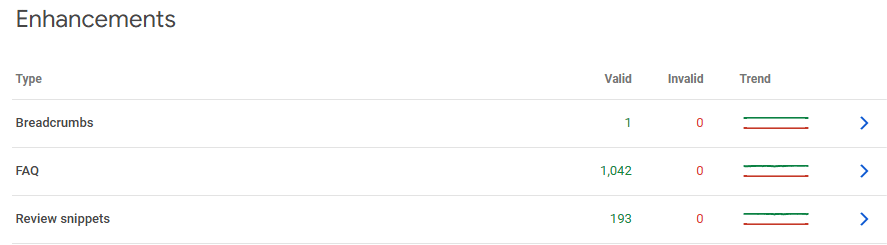
The Enhancements table is simple, but it is still helpful to monitor schema usage and detect problems. Here are some of the things you can watch for with this data:
- Each row indicates a new type of schema Google has detected, along with a count of how many items are valid or invalid. Invalid schema would indicate that there are missing required fields. Clicking on the row will show you the details about why the schema is invalid. Typically, Google will also include example URLs with the error.
- Clicking on a row will also show you which valid pages contain that schema markup type. Remember that even if Google reports valid schema, you still need to manually check that the schema accurately represents your website’s content.
- This table also provides trend lines for each schema type, which can help you spot changes over time. For example, if you recently added Product schema and Google begins reporting more valid product snippets, that is a good indication that Google is finding the new markup. On the other hand, if you have had Product schema in place for a long time but Google only recently began detecting it, that may indicate a problem worth investigating.
- The table may also show a row for “Unparsable structured data”. If that is listed in the table, that means there are errors with the schema markup code, such as a syntax problem with a missing comma or bracket.
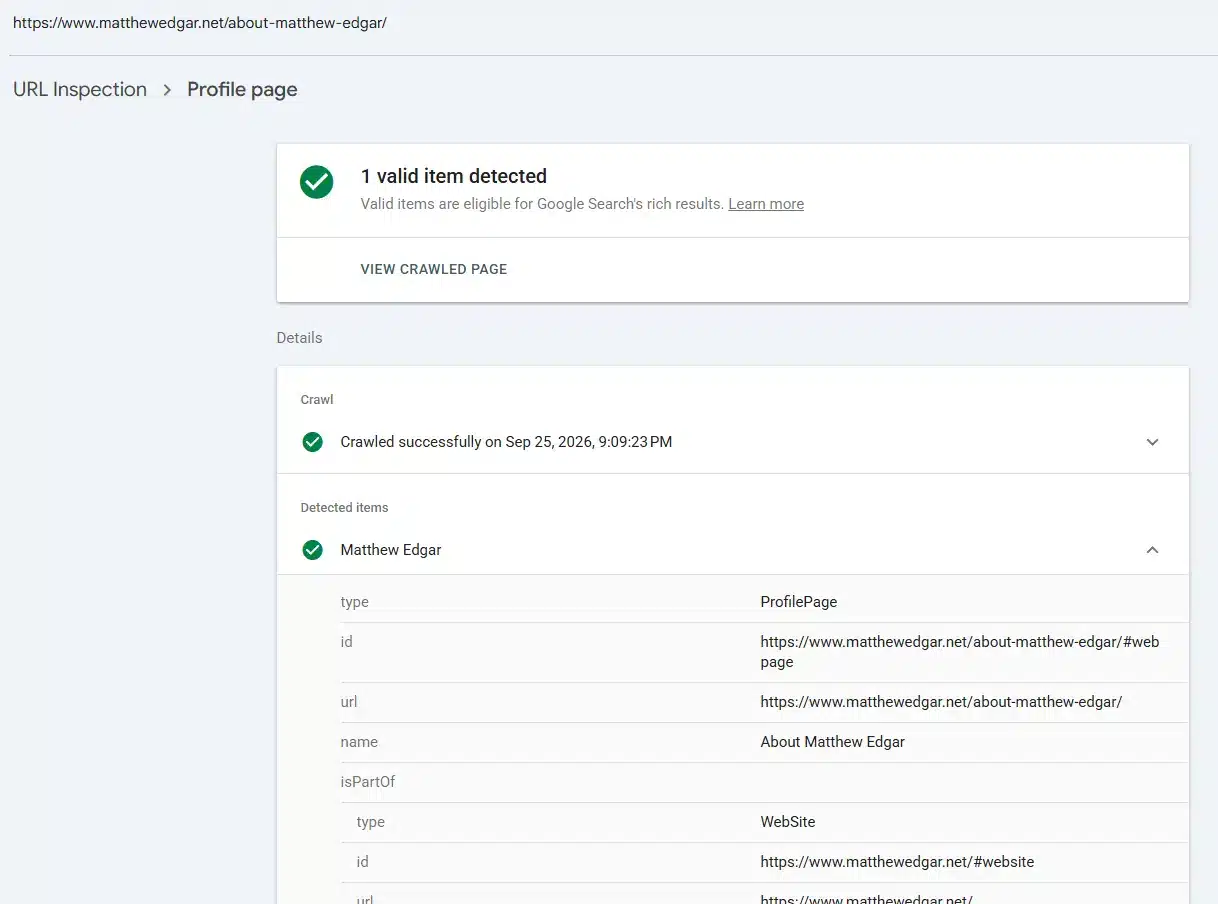
Google Search Console’s URL Inspection report can also help you understand what Google detects on a specific page. When you inspect a URL, the Enhancements section may show items such as product snippets, breadcrumbs or review snippets. You can expand these items to see more detail about the structured data Google detected. This is useful when you are testing a specific implementation or troubleshooting a page where you are unsure whether Google is recognizing the markup. In this screenshot, Google is successfully detecting ProfilePage schema on my site’s about page.
You can also see how schema is helping search rankings using Google Search Console’s Performance report. Once on Performance, select the Search Appearance tab in the table below the graph. Some of these appearances are associated with structured data, such as review snippets, product snippets or video results. On this report, you can also see if that schema is used in rankings and if it is helping to improve clicks or impressions.
I walked through how to use all of these reports in Google Search Console in more detail in this video:
Find Schema Using Website Crawl Tools
The biggest problem with using Google Search Console’s reports is that it only lists the schema types Google supports. It does not show all the schema types available on schema.org that may be used on the website.
To help find all types of schema used on a website requires using a website crawl tool that can detect schema markup. ScreamingFrog offers a way to detect this, as does Ahrefs, along with many other tools.
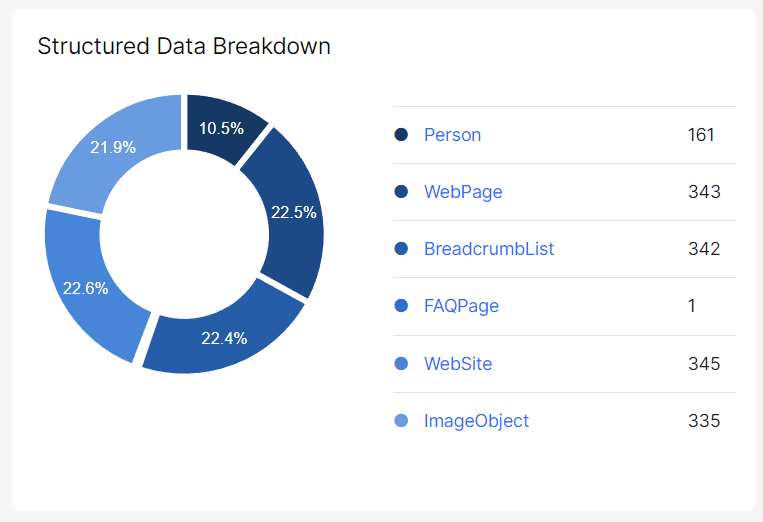
Here is an example from JetOctopus that shows all the different schema types that were detected during a site crawl. Along with showing all the schema types used, their reports also show the unique values for those schema types across the website. It will also show you the pages that contain the markup.
Testing Schema Markup
Once you’ve found schema on your website, you need to test the schema markup. Google Search Console provides some validation, but there are other tools we can use to validate schema and review how it represents our website’s content.
When testing, be sure to test schema across multiple page types. If the schema is added via a template, such as schema added to all blogs or all products, review the schema implementation on several different pages using that template.
Also, when testing, you are not only looking for errors or problems with the code. You also need to confirm that the schema markup correctly represents your website’s information. Schema markup should use the most relevant types and properties. Review any relationships established within the schema markup to confirm they accurately reflect the nature of those relationships.
Google’s Rich Results Test
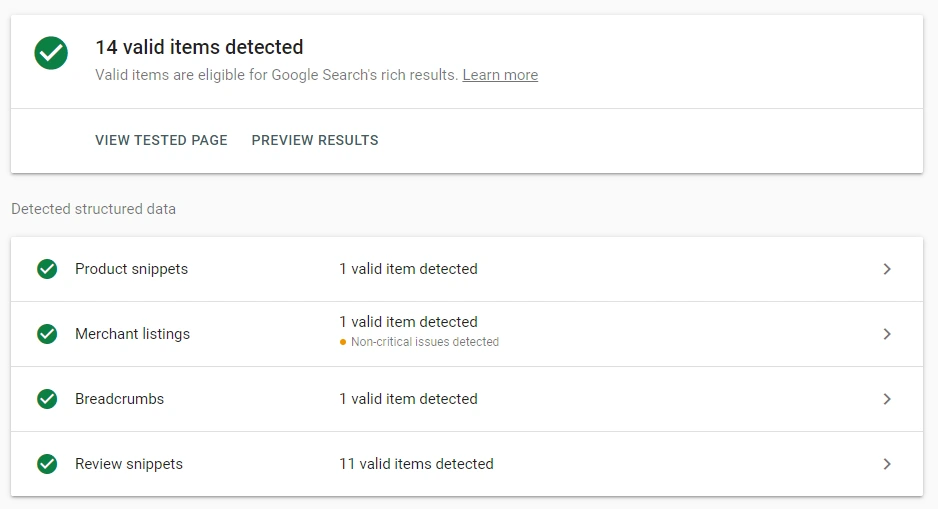
Google offers a Rich Results Test. Rich results are a broad category of enhanced search results, including search results enhanced because of schema markup. You can enter a URL to fetch or put in the code you want to evaluate. Google will tell you what items it detected. If you click on any of these items, you can view details about the markup. This is similar to Google Search Console’s URL Inspection tool, but you do not need a Google Search Console account or access to the website to use it.
Schema.org Validator
Schema.org provides a free schema markup validator to test your schema code. Unlike Google’s Rich Results Testing Tool, Schema.org will show you any schema added to the website and not just the specific schema types Google supports.
After accessing Schema.org’s validator, either enter a URL to evaluate or copy/paste a code snippet. Click “Run test”. Once the test is completed, you will see the evaluated code on the left side of the screen and the schema types detected on the right side. You can review this code to confirm that all content is properly represented in the schema code.

Need Help?
Do you need help using schema markup on your website? Contact me and let’s talk about how to utilize schema within your SEO and GEO efforts.
Prefer a more DIY approach? Order my book, Tech SEO Guide, a reference guide to help you address schema and other technical SEO issues on your website.
More Information
More Articles
Schema Entity Mapping
Learn how to build an entity map, connect entities with schema markup and @id, and decide which information to repeat across your website.
Read Schema Entity Mapping →Structured Data: What Is Schema?
What is schema.org? Why should you use schema on your website for SEO and AI search? What common problems happen? How do you test schema?
Read Structured Data: What Is Schema? →