How much time does Google take to load your website? Slower crawls can impact performance. Here is one way to find out:
To see how quickly Google can crawl your website, you can use Google Search Console’s Crawl Stats report. To access this report, click on Settings in the Google Search Console Sidebar and then click Open Report under the Crawling section.
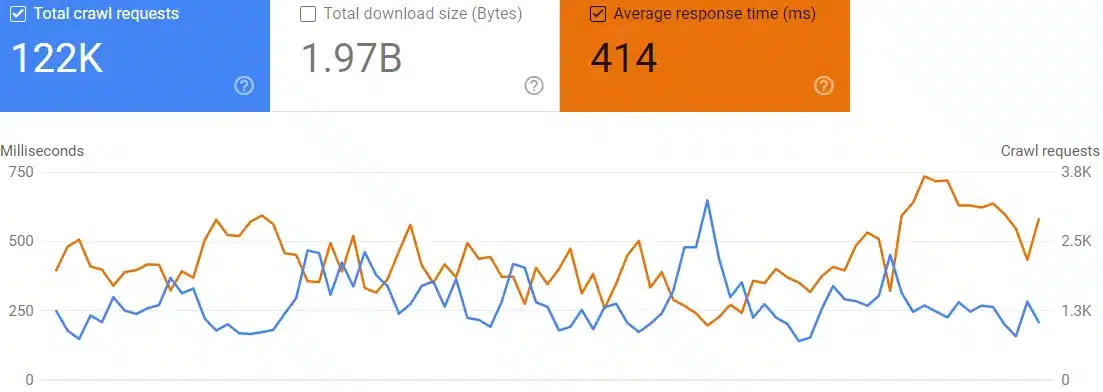
In the graph, you can toggle on “Average Response Time” and “Total Crawl Requests” to see how these two numbers trend together.
- Total Crawl Requests: how many times Google requested a page from the website over the last three months
- Average Response Time: the average time it took Google to load all of the files that were crawled
The first thing to review is the Average Response Time by itself. Google does not have any specific guidelines around this but generally, the response time should be kept below 1,000 milliseconds (one second). Also, the response time should be steady over time, and any spikes, like those seen in the following screenshot, could indicate new problems and should be investigated.

However, the more interesting insights come from looking at Average Response Time in relation to Total Crawl Requests. If Google starts crawling more pages, does the Average Response Time stay the same or increase? An increase could mean the server is struggling to handle the increase in Google’s crawl volume.
In other cases, we end up with a graph like the one below. Fewer pages were being crawled (the blue line), but Google was somehow spending more time loading those files (the orange line). That could indicate configuration issues with this server, preventing the server from returning files quickly.
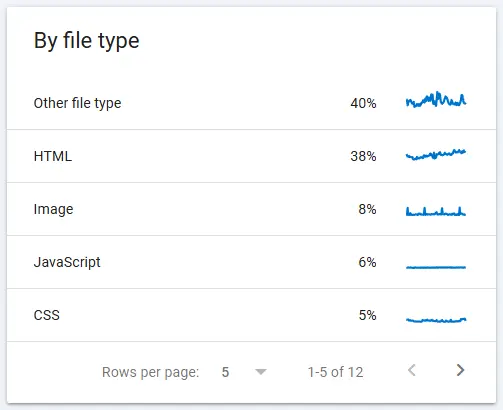
You can get a deeper understanding of average response time by clicking into the detailed reports under the “By file type” table. This is below the graph. For example, you can click into JavaScript to see how quickly Google can crawl JavaScript files. You may find that HTML files load quickly, but images or CSS files load more slowly following a recent upgrade.