How do I manage my website’s crawl budget? I get asked this question a lot but I don’t think “crawl budget” is quite the right way to think about this. That’s because crawling isn’t one single thing.
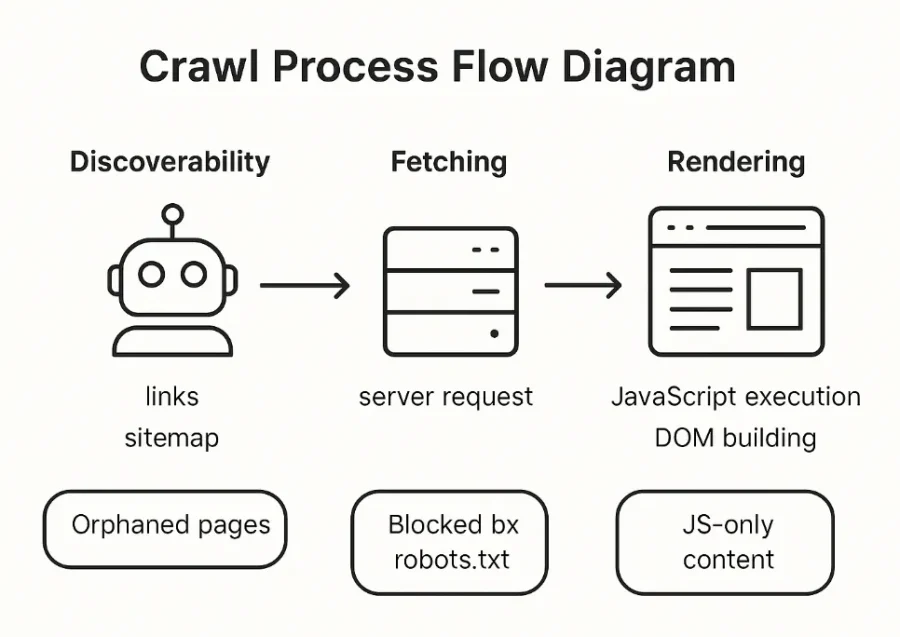
Crawling happens in stages. Each stage comes with its own challenges and opportunities to improve how bots interact with your site. Instead of “crawl budget”, it is better to think about managing the three key stages of the crawling process:
1. Discoverability
This is where bots find your URLs. Bots primarily discover new pages through links (internal and external). A high number of “Discovered, Not Indexed” URLs in Google Search Console can indicate that URLs are getting stuck at this initial step.
To improve discoverability, check for orphaned pages, enhance internal navigation structures, add relevant internal links and make sure links are coded correctly (<a> vs. <button>, href vs. onclick).
Managing discoverability means knowing what pages bots should find, then making sure bots can and do find all of those pages.
2. Fetching
Once discovered, Google, Bing, OpenAI, Meta and others send bots to request the page from your server. This is what many people mean when they say “crawl”, but it’s only one part.
If a URL is blocked by robots.txt, firewalls or server issues, it will not be fetched.
To manage this step, we need to make sure the right pages are getting fetched. We can monitor fetch activity in our website’s log files to see if all the URLs that should be fetched are being fetched. Bots should also fetch CSS, JS and image files along with HTML pages.
Managing fetching is also about getting our server to respond quickly and reliably to each request. Improve server speed (especially Time to First Byte) and reduce server errors.
3. Rendering
After fetching, bots need to render the page. This involves converting all the files received from the server into a functioning webpage. The biggest part of rendering is executing JavaScript.
Google and Bing typically render pages but they can make mistakes or errors can prevent JavaScript execution. AI bots (like ChatGPT-User) currently do not execute JavaScript.
If your page relies heavily on JavaScript to load content, bots might miss it. As much as possible, load content from the server not from JavaScript. Using clean, valid HTML to simplify rendering. Avoid slow or complex JavaScript where possible.
Test how your website is rendered. Where does it rely on JavaScript to load content? Rendering issues are a common cause of “Crawled, Not Indexed” errors so test rendering on any of those pages.
Recap
Don’t worry so much about “Crawl Budget”. Instead, think about how bots move through each stage…
- Ensure important pages can be discovered. Fix orphaned pages and strengthen internal linking.
- Make sure the right content is being fetched. Make sure key pages can be fetched as simply as possible.
- Improve rendering. Use clean HTML and reduce content loaded via JavaScript to avoid rendering failures.