
JavaScript is an essential part of websites. As of December 2025, websites load a median of 21 JavaScript files on mobile devices and 23 on desktop devices. If a visitor is unable to load or execute those JavaScript files, the visitor may be unable to see all of the website’s content or interact with the website successfully. While modern browsers typically load and execute JavaScript reliably, slower connection speeds can cause issues with the JavaScript files, resulting in a poor user experience.
The bigger challenge is how SEO and AI bots load and execute JavaScript files.
- Google has been able to execute some JavaScript for years. However, Google does not execute JavaScript on the first crawl of the website and must take an additional pass to execute the content (in a process called rendering). That means, Google may not see content loaded via JavaScript if it does not take the additional pass when crawling your website.
- AI bots, like OpenAI’s ChatGPT-User or OAI-SearchBot, do not currently execute JavaScript (an additional study found the same and other studies have as well). With AI search becoming a more important part of the SEO landscape, this presents a new challenge. Any content loaded by JavaScript will not influence AI models, potentially limiting your ability to appear in AI responses.
My best recommendation is to limit the use of JavaScript, at least for loading core content. JavaScript can and should be used to enhance the page by adding features or functionality. In this article, let’s review the basics of handling JavaScript for optimal SEO performance, both for Google and AI search.
How Content is Loaded: Client-Side and Server-Side Rendering
Before we review the details of JavaScript for SEO and AI Search, let’s take a step back and discuss the different ways you can load content into a web browser. The process of loading content into the browser is known as rendering.
One of the most fundamental (and common) methods of rendering is Server-Side Rendering. As the name suggests, the rendering happens on the web server. This means when a visitor requests a page from your website, your web server will pull together the necessary HTML code and send that code to the browser. The browser doesn’t have to do anything more than load the HTML code. Instead, the browser simply has to convert the HTML into a visible web page. Note that you will often hear server-side rendered code referred to as the “raw” code.
Next, we have Client-Side Rendering. With client-side rendering, the server still sends back some amount of HTML code when a visitor requests a page. However, the HTML code that the server sends back is not the entirety of that web page. Instead, the HTML code sent back by the server includes references to JavaScript code as well. The browser must execute this JavaScript code to fully load the page. Executing the JavaScript code happens on the visitor’s browser—and the visitor’s browser is known as the “client”, hence the name “client-side” rendering. Note that for simplicity, client-side rendered code is often referred to more simply as “rendered” code.
The JavaScript that is executed by the browser (or client) can be triggered via different types of events that happen within the browser. Those events include a web page fully loading, a click or tap on a link, scrolling, mouse movements, and more. You can see a complete list of events that can trigger JavaScript code.
One of the most important JavaScript events for SEO purposes is the load event. This event is triggered when the HTML has been loaded into the browser. Once the load occurs, you can execute JavaScript code to alter something about the website’s appearance.
In some cases, the JavaScript code can add additional content to the page. In the following example, the JavaScript code adds extra text to the page once the page is loaded. Here is what the output (left side) and code (right side) look like when it is returned from the server:

Then once JavaScript loads and is executed, extra text is added:

In other cases, the HTML sent back from the server only contains an empty shell. There is no content provided via the server. The JavaScript executed on the load event fills in that empty shell with the entirety of the website’s content. When you view the server-side source, you will see blank content:

Then, once JavaScript loads and executes, the page’s content will appear:

While using the load event is the most common, you can also load content into the browser with different types of events. Let’s say you have content presented in tabs. Those tabs might be empty containers initially but once a visitor clicks on the tab, the JavaScript code loads content into the tab. You could also load content once a visitor moves their mouse or hovers over an object (though, for obvious reasons, this doesn’t work on phones or tablets).
Something similar happens with scrolling, as we can see with infinite scrolling. The content lower on the page isn’t loaded until you begin to scroll further down the page. For example, Pinterest uses this to load images as you scroll down the page. In this animation, you can see how colored placeholder boxes are filled in as you scroll through the page.

Best Choice: Why Server-Side Rendering Is Preferred
The best way to ensure search and AI bots can see your content is to use server-side rendering. All of the HTML (and the content contained in that HTML) is processed on the web server and there is no JavaScript for the browser to load or execute. As a result, the robot does not have to do any additional work to display the content.
Server-side rendering is also the best way to ensure all human visitors to your website reliably see your content. While most visitors should have no trouble loading and executing JavaScript, a visitor may have a slower connection or encounter an error in the browser, causing the JavaScript files not to load correctly.
Server-side rendering will also work better for AI bots, including OpenAI and Perplexity. As noted above, bots from these AI tools cannot execute JavaScript (at least currently).
What JavaScript Google Supports
If you cannot use server-side rendering and need to use JavaScript to load content, then you need to understand what JavaScript Google supports. There are two main concepts to consider:
- First, make sure that Google can access your JavaScript files. You should not block any JavaScript files required to load your website’s content via a robots.txt disallow (or any other method).
- Second, while Google’s bots use a headless browser that is capable of executing JavaScript, Google’s bots do not scroll, click links or buttons, move a mouse, swipe, or any other types of interactive events. Any content that loads into your web page in response to those types of events will not be visible to Google’s bots. However, Google typically will see content added by the load event.

In short, allow Google to crawl all of your website’s JavaScript files and load any content via JavaScript via the load event.
Remember, however, that Google does require a second pass through the page to execute the JavaScript files. There are a few instances where Google will likely not complete this second pass and not execute JavaScript on a page:
- Noindex: If the server-side HTML contains a meta robots noindex tag, Google will typically skip rendering JavaScript. This can present a problem, however, if the server-side version of a page contains a noindex, but the client-side version does not.
- Non-200: If a page does not return a status 200 code, then Google will not put the page through a second pass to execute JavaScript. Google’s logic makes sense: why waste resources executing JavaScript for a page that shouldn’t rank in search results?
Bottom line: I’ve seen very few instances where Google cannot execute a load event, provided Google takes a second pass to render the website content. This tends to be a reliable method when you must load content via JavaScript. When Google’s bots fail to execute the load event, it is usually because the JavaScript files were blocked from bot access.
Practical Example: Tabbed Content
Let’s walk through a common example where this can become a problem. A website has text contained within tabs. The text contained in the tabs is not loaded as part of the server-side code. Instead, that text is only loaded when a visitor clicks on the tab. In this example, clicking the tab keeps you on the same page and loads new content into that same page. Visitors will be able to see this text if they click on the tabs because, in modern browsers, they will be able to trigger the JavaScript code connected to the click event. But bots cannot click on those tabs, and, as a result, bots won’t trigger the JavaScript code that loads in that text. Google’s bots would not see this text and this text will not help your website rank.
Instead, the text in the tab should be loaded as part of the server-side code but hidden from view via CSS. When clicking the tab, JavaScript changes the CSS to show the text to visitors. With this configuration, visitors would see the same experience with the tabs. However, Googlebot (and AI bots) would be able to see the tab text as well because it is in the server-side code.
Additional consideration: If links are loaded via JavaScript, that can prevent bots from using those links to discover content on your website. Learn more about how bots discover content on your website.
What If Google (and AI Bots) Can’t Execute Your JavaScript?
What do you do if Google can’t see the content you are loading via JavaScript? How do you show content loaded by JavaScript to AI bots that can’t execute JavaScript?
One option is to convert your code to load content via server-side rendering instead of client-side rendering. However, changing to server-side rendering may not be a practical alternative, so let’s discuss other alternatives you can use if Google can’t execute your website’s JavaScript.
Noscript
A <noscript> tag contains content that should be shown to visitors who have JavaScript disabled. As a simple example, you can see the <noscript> tag on line 8 in this code. Any visitor who loads the website without JavaScript enabled will see “No JavaScript.” written to the screen.

While that is a simple example, and an example where even Googlebot could execute the JavaScript, the <noscript> tag becomes more important when there is JavaScript that Googlebot cannot execute. Take for example content that is loaded into the browser when a visitor scrolls down a page. As we discussed above, bots won’t be able to see this content because bots don’t scroll. However, you can place the content shown after scrolling within a <noscript> tag. That way bots still can see that content.
Prerendering
With prerendering, you render the content differently for bots than for human visitors. Human visitors will continue to see content loaded via client-side rendering (with JavaScript). However, bots won’t see the client-side rendering and instead will see “prerendered” content. A prerendering engine executes the JavaScript in advance and delivers the output to bots so that bots do not have to load or execute any JavaScript code. Prerendering engines can also execute click, scroll, and other non-load events, allowing you to show more content to bots. Using a prerendering engine gives you more control over how bots load a page and will ensure bots will see all the content on your website.
To generate pre-rendered content, you pass your HTML and JavaScript code through a prerendering engine. This renderer loads the page, including executing the JavaScript functions needed to load all page content, and saves the output in static HTML pages. Anytime a specific bot, such as Googlebot or OpenAI’s bot, visits the website, they are directed to the prerendering engine and crawls the static HTML page. The diagram from Prerender.io gives an idea of how this works with the server detecting whether it is a browser (human) or crawler (bot) making the request and changing what content is delivered.
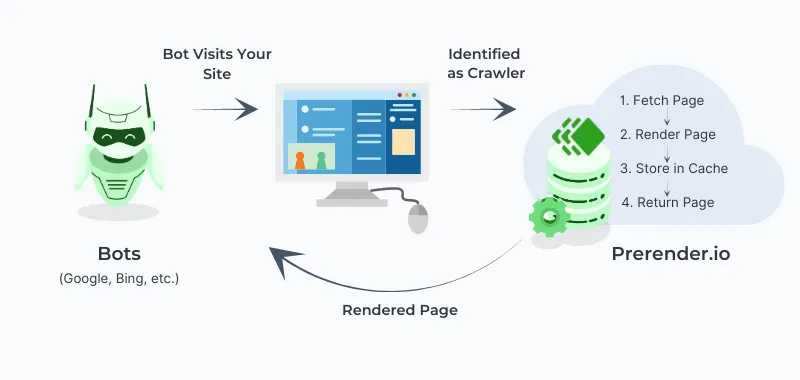
When using dynamic rendering, the content seen by bots must be equivalent to the content seen by humans. That means the pages shown to bots and humans must serve the same purpose and intention. If you use prerendering as a way of sneaking in highly optimized content that only bots can see, Google will likely catch on and your site could receive a manual action.
Final Thoughts
You can and should use JavaScript to enhance your website. Doing so can make your website more engaging and interesting for visitors. However, when using JavaScript, you want to make sure that search and AI bots can see all the content your website has to offer. This requires understanding what content on your website is loaded via server-side and client-side rendering and, for client-side rendered content, understanding if it is loaded in a way that bots can support. If you have questions or need help, please contact me.
More Articles
Schema Entity Mapping
Learn how to build an entity map, connect entities with schema markup and @id, and decide which information to repeat across your website.
Read Schema Entity Mapping →Schema: Find, Fix & Prevent Problems
Find and fix common schema markup problems, from invalid code to rendering issues. Learn how to audit and test schema with crawlers and validation tools.
Read Schema: Find, Fix & Prevent Problems →